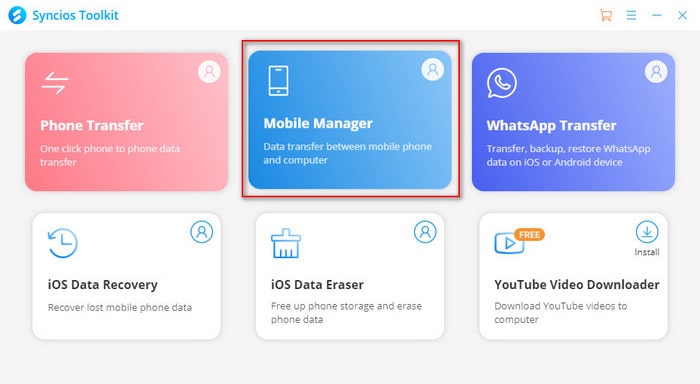
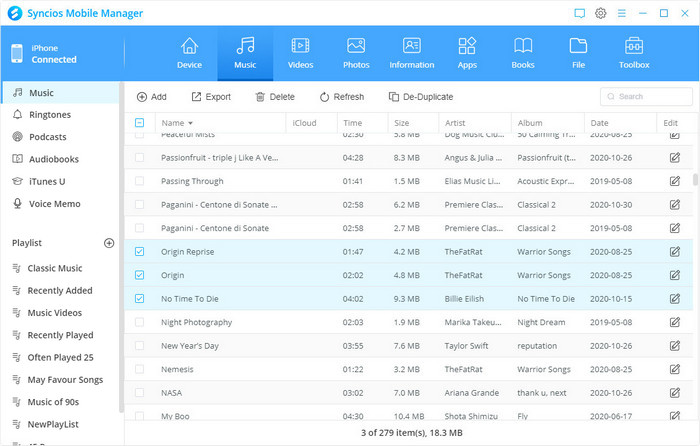

Anvsoft Syncios Mobile Manager Pro is a versatile mobile management tool that allows users to transfer, backup and manage data between iOS/Android devices and computers. It supports apps, photos, music, videos, contacts and more, and offers advanced features such as user-friendly interface, ringtone creation, device backup, etc. It is suitable for efficient data management and cross-platform management.
OVERVIEW OF ANVSOFT SYNCIOS MOBILE MANAGER
Anvsoft Syncios Mobile Manager Pro is a powerful and versatile mobile management tool for users who need to take more control over their smartphones. Compatible with both iOS and Android platforms, this software provides a comprehensive solution for managing mobile data on a computer. Whether you want to back up your files, transfer data, or manage your apps and media, Syncios Mobile Manager Pro offers comprehensive features to meet the needs of both basic and advanced users.
Basically, Syncios Mobile Manager Pro is great for data transfer and backup. It allows users to seamlessly transfer content such as photos, music, videos, contacts, messages, and even apps between devices and computers. Unlike some competing software, Syncios supports cross-platform data transfer, which is especially useful for users switching between Android and iOS devices. The one-click backup and restore feature helps users protect their data or quickly restore it in case of device loss or system failure.
One of the standout features of Syncios is its media management capabilities. Users can easily organize their music and video libraries, create playlists, and even convert media files to formats compatible with a specific device. The built-in audio and video converter supports a wide range of formats, eliminating the need for third-party tools. In addition, the ringtone maker allows users to create ringtones from any audio file with simple editing tools.
Another useful aspect is the software’s ability to manage installed applications. You can install, uninstall, backup, and export applications from your device, which is great for freeing up memory space or preparing to reset your phone. The software also allows for bulk operations, such as deleting multiple contacts and messages at once.
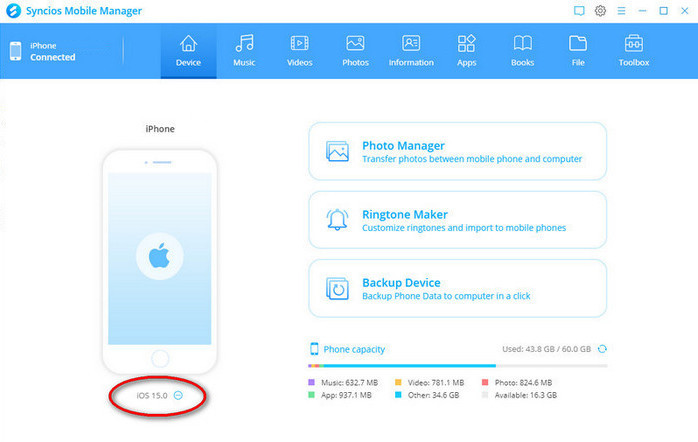
Syncios Mobile Manager Pro includes a device information screen, file system access, and even a HEIC to JPG converter, making it easy to manage iOS image formats on a Windows computer. The interface is clean and intuitive, with intuitive navigation and drag-and-drop support, so even non-technical users can use the software without a learning curve.
Overall, Anvsoft Syncios Mobile Manager Pro is a reliable and feature-rich application for users who want to have complete control over their mobile data. Whether it’s for personal backup, phone switching, or advanced media management, it provides a smooth and efficient experience across the platform.
FEATURES OF ANVSOFT SYNCIOS MOBILE MANAGER
ONE-TAP BACKUP AND RESTORE
This unique feature allows users to create a complete, high-quality backup of their entire device, including apps, settings, WhatsApp data, messages, contacts, photos, videos, music, e-books, playlists, bookmarks, and call logs, directly to a computer or external hard drive, bypassing iTunes or iCloud restrictions and file size limits. Backups are quick with one click, and preserve the original format and metadata for reliability. Restore is highly flexible, allowing you to selectively restore specific data types to your new phone without overwriting unrelated files, making it perfect for upgrading, repairing, or switching between platforms from iPhone to Android or vice versa. It ensures that no data is lost during the transfer, and supports incremental backups to save time in repeated sessions.
TRANSFER BETWEEN PHONES
Transfer complex data sets between devices, including contacts, messages, photos, music, videos, e-books, apps, playlists, bookmarks, and call history, seamlessly from one phone to another or via a computer intermediary. It handles transfers from iOS to Android (e.g., iPhone to Samsung) or within the ecosystem without quality degradation or limitations, and has the advantage of cross-platform compatibility. Even large operations exceeding 20GB are performed quickly while maintaining file organization and integrity. Ideal for family sharing, business transfers, or personal updates, this tool eliminates the hassle of manual synchronization and supports selective transfers for targeted transfers.
EDIT AND MANAGE DATA
Edit and organize your personal data directly on your computer: merge duplicate contacts, add/edit details, delete bulk messages or call logs, export full WhatsApp conversations with attachments, and manage apps via the install, uninstall, or export feature. Drag-and-drop access makes it easy to add ringtones, documents, or files to your phone’s memory and SD card. Duplicate removal tools automatically clean up libraries, while full phonebook and message editing reduce clutter on your device. This desktop-centric approach saves battery life and time, and improves efficiency across thousands of tasks in batch.
MEDIA TOOLS AND CONVERSIONS
You can convert HEIC images to editable JPG format in bulk, create custom GIFs from videos, and simplify organization by removing duplicates from your music and photo libraries. As a robust alternative to iTunes, it lets you export playlists, create ringtones, and transfer multimedia at high speeds without compression. Batch conversion supports a variety of formats, while tools like the video exporter preserve quality for professional use. These features enhance the creative workflow for content creators editing mobile media on the desktop.
FILE SYSTEM EXPLORER
View and manage your phone’s folders like native Windows folders: add, delete, copy, move, or export files like documents, ringtones, videos, photos, and apps with complete drag-and-drop freedom. Compatible with all iPhone, iPad, iPod Touch, and Android models, it simulates root-level access for experienced users without jailbreaking. Quick preview and sorting options help you find files instantly, while export paths seamlessly integrate with PC software for further editing. This opens up unlimited management and is ideal for developers testing applications or users archiving large folders.
SYSTEM REQUIREMENTS
- Supported OS: Windows 11/10/8.1/7
- Memory (RAM): 1 GB of RAM or more is required
- Hard Disk Space: 100 MB or more required