Scooter Beyond Compare is a powerful file and folder comparison tool that helps you analyze differences in text, data, folders, and more. It provides a simple interface for merging, syncing, and code review, making it ideal for developers, IT professionals, and everyday file management.
OVERVIEW OF SCOOTER BEYOND COMPARE
Scooter Beyond Compare is a comprehensive and flexible comparison and synchronization tool designed to manage files, folders, and entire data sets faster and more accurately. Developed by Scooter Software, Beyond Compare has become popular among programmers, IT professionals, and everyday computer users thanks to its comparison capabilities, user-friendly interface, and efficiency in solving complex data management tasks.
Essentially, Beyond Compare allows users to compare files and folders side by side in a clear and structured way. It makes it easy to find differences, identify missing or modified data, and synchronize content across multiple locations. The software goes beyond simple file comparison by supporting text files, documents, source code, images, spreadsheets, and even binary files. This versatility makes it a powerful tool not only for developers, but also for anyone who needs to ensure the accuracy of digital content.
FEATURES OF SCOOTER BEYOND COMPARE
FILE AND FOLDER COMPARISON
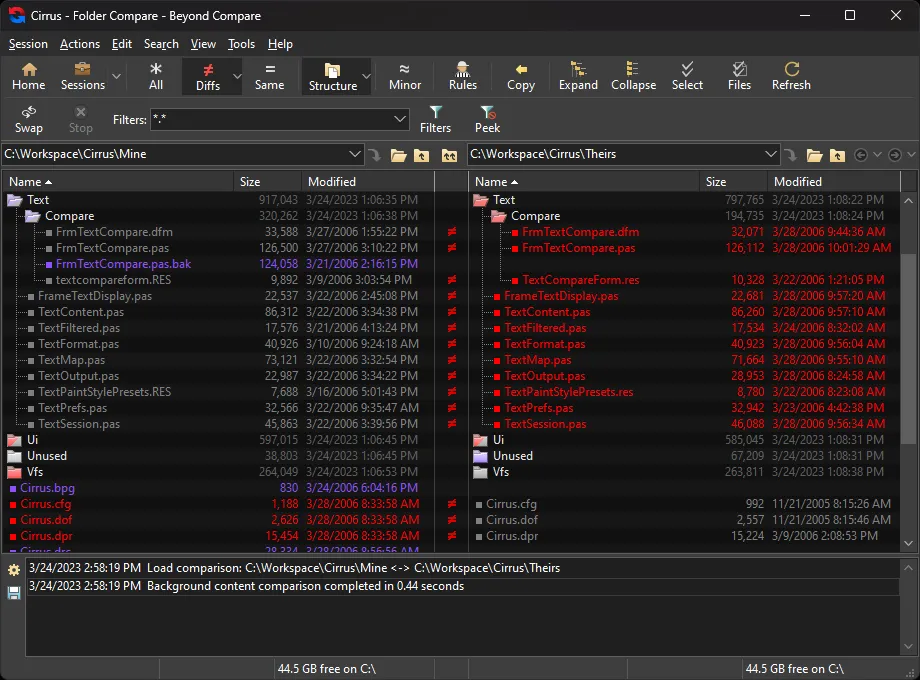
Beyond Compare specializes in side-by-side comparison of files and folders. Users can easily spot differences in content, structure, and attributes, making it ideal for tasks such as project synchronization, backup verification, and code change tracking. The clear interface highlights additions, deletions, and changes for quick analysis.
TEXT AND CODE COMPARISON
One of its main advantages is its detailed comparison of text and source code. In addition to the comparison, it also highlights character-level differences, which is useful for programmers and writers. Syntax highlighting for popular programming languages makes code easier to read and allows you to detect subtle changes between versions.
3-WAY MERGE AND VERSION CONTROL MERGE
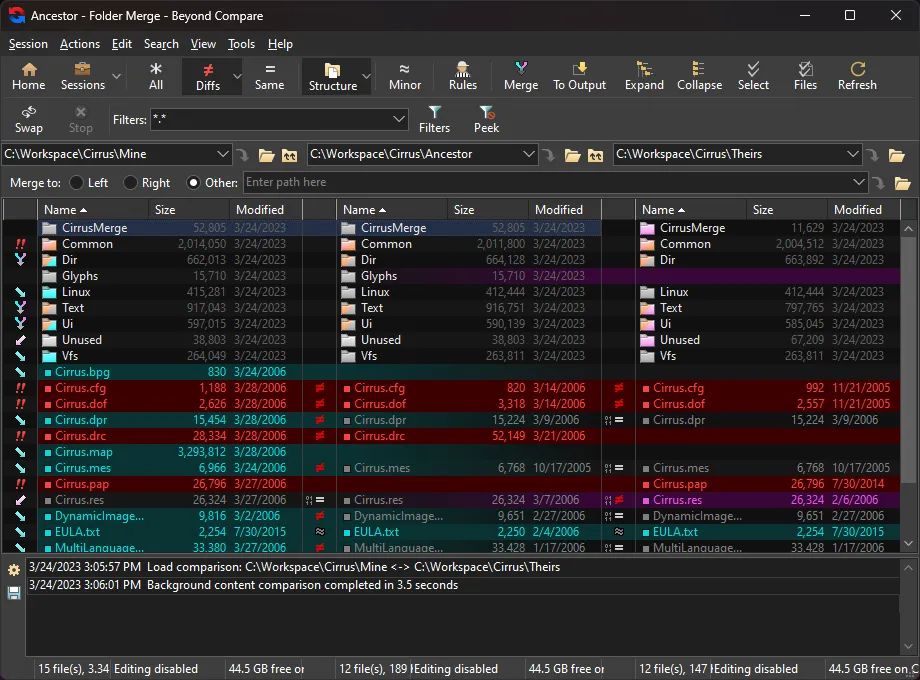
Beyond Compare includes a 3-way merge feature that allows users to merge changes from two different versions of a file into a common master version. This is especially useful for software development where multiple team members are working on the same project. It also integrates seamlessly with popular version control systems such as Git, Subversion, and Mercurial.
FOLDER SYNC
The software allows users to synchronize folders between different drives, servers, or cloud storage. This can be done one-way (mirroring) or two-way (keeping both sides the same). The synchronization rules can be customized, ensuring that important data is compatible across devices or storage platforms.
ARCHIVE AND FTP SUPPORT
In addition to comparison, compressed archives (such as ZIP or RAR) can be opened and compared without first extracting them. In addition, it supports FTP, SFTP, and cloud connections, allowing users to directly compare files on remote servers or storage services. This makes it especially useful for web developers and IT professionals.
DATA COMPARISON TOOLS
In addition to plain text, the program supports the comparison of various data formats, including images, binary files, and registry entries. For example, image comparison can highlight visual differences, while binary comparison highlights byte-level differences. This versatility allows users to manage different file types within a single platform.
CUSTOMIZABLE RULES AND FILTERS
In addition to comparisons, users can define rules for what to compare and what to ignore. For example, users can filter by whitespace differences, code comments, or specific file types. This customization allows the comparison to focus only on meaningful changes, saving time and reducing clutter.
REPORTING AND DOCUMENTATION
The program includes robust reporting options. Users can generate comparison reports in HTML or plain text, which is useful for sharing results with team members or maintaining documentation of changes. These reports can be saved, printed, or emailed, making collaboration easier.
SYSTEM REQUIREMENTS
- Supported OS: Windows 11/10/8.1/7
- Memory (RAM): 1 GB of RAM or more is required
- Hard Disk Space: 100 MB or more required