
Zbrainsoft Dose for Excel is a powerful Microsoft Excel add-in that increases productivity with over 100 advanced tools and features. It simplifies data cleaning, worksheet comparison, text manipulation, formula creation, formatting, and workbook management. Designed for professionals, specialists, and everyday Excel users, Dose for Excel automates repetitive tasks and helps users perform spreadsheet tasks more efficiently.
OVERVIEW OF ZBRAINSOFT DOSE FOR EXCEL
Zbrainsoft Dose for Excel is a productivity add-in for Microsoft Excel that extends the capabilities of Excel with over 100 advanced tools and utilities. It is designed to help users automate repetitive spreadsheet tasks, reduce manual work, and improve overall efficiency when working with data. Whether you are working with financial reports, business records, inventory, or large data sets, Dose for Excel offers practical solutions to simplify everyday spreadsheet management.
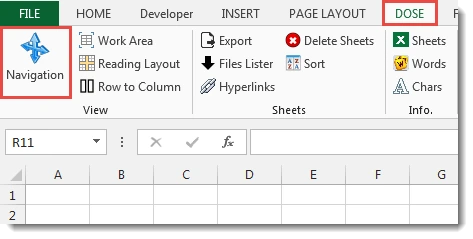
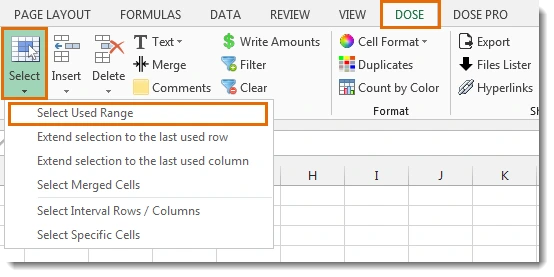
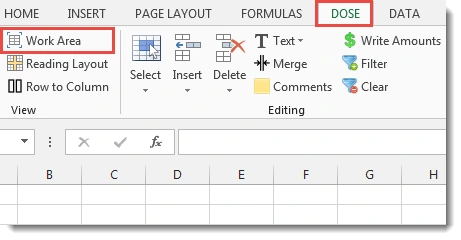
The add-in is integrated directly into the Excel ribbon via a dedicated “Tools” tab, giving users quick access to a wide collection of editing, formatting, comparison, formulating, and worksheet management tools. These include advanced text manipulation, duplicate data removal, data cleaning, random data generation, workbook backup, sheet comparison, markup management, color-based analysis, and many other time-saving features. Built-in formula helpers and advanced functions eliminate the need to write complex formulas or VBA code for many common tasks.
Dose for Excel supports modern versions of Microsoft Excel and is ideal for accountants, analysts, office professionals, educators, and anyone who regularly works with spreadsheets. With an intuitive interface, multi-language support, and comprehensive tools, it transforms Microsoft Excel into a more powerful and productive workspace, dramatically reducing repetitive manual tasks.
FEATURES OF ZBRAINSOFT DOSE FOR EXCEL
ADVANCED EDITING AND DATA MANAGEMENT
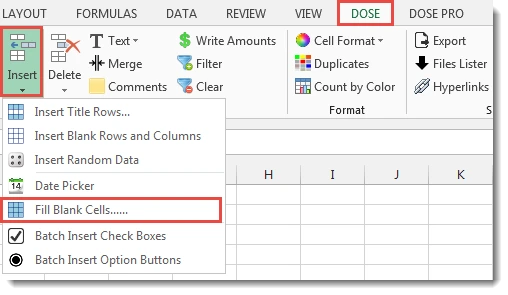
Dose for Excel adds a host of editing tools that simplify everyday spreadsheet tasks. Users can quickly insert blank rows or columns, generate random data, fill blank cells, delete duplicate or hidden rows, remove unwanted objects, and select specific ranges with just a few clicks. These features eliminate repetitive manual work and improve productivity when working with large data sets.
POWERFUL TEXT AND FORMULA TOOLS
The additional tools include a comprehensive collection of text processing tools that can split, merge, invert, trim spaces, change capitalization, extract text, convert numbers to words, and remove unwanted characters. It also offers built-in formula helpers and advanced functions that simplify complex calculations without the need for VBA programming or writing long formulas by hand.
DATA CLEANUP AND SPREADSHEET COMPARISON
Dose for Excel offers tools to clean imported or unstable data. Users can remove extra spaces, non-printing characters, and line breaks, convert stored numbers to text, and standardize text formatting. It also offers worksheet and list comparison tools to identify added, deleted, or changed data, making auditing and version control easier.
WORKSHEET ORGANIZATION AND AUTOMATION
The software includes features such as exporting individual worksheets, sorting sheet tabs, deleting blank worksheets, creating index sheets with linked sheets, numbering pages, and automatically backing up workbooks. These automation tools help protect important files from accidental data loss and organize large Excel projects.
FORMATTING AND VISUALIZATION ENHANCEMENTS
Dose for Excel improves the readability of spreadsheets through alternative row and column shading, customizable formatting styles, overlapping highlighting, and color-based analysis tools. Users can count, average, and sum cells based on background or font color, making visual data analysis more effective. The organizational reading tools improve navigation on large worksheets.
USER-FRIENDLY INTEGRATION AND CUSTOMIZATION
The add-in integrates seamlessly with Microsoft Excel using its own ribbon tab, allowing users to access all features without leaving Excel. It supports multiple languages, customizable settings, automatic workbook backups, and is compatible with versions of Excel from Excel 2007 to Microsoft 365. Its intuitive interface allows both novice and experienced users to automate spreadsheet tasks with minimal learning curve.
SYSTEM REQUIREMENTS
- Supported OS: Windows 11/10/8.1/7
- Memory (RAM): 1 GB of RAM or more is required
- Hard Disk Space: 100 MB or more required