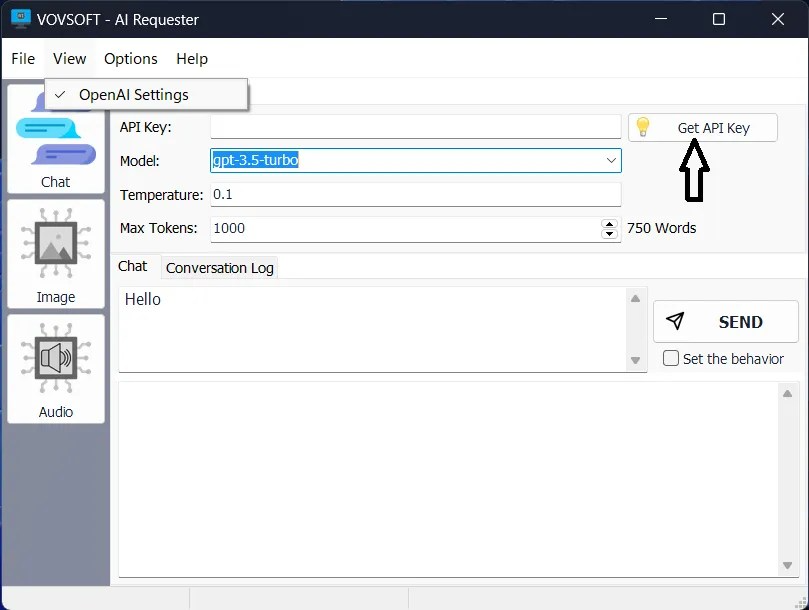

VovSoft AI Requester is software that easily connects to the OpenAI API. It provides users with a reliable and easy-to-use interface that is compatible with the latest artificial intelligence technologies such as GPT. The software is designed to be user-friendly and intuitive, and even non-technical users can easily connect to the OpenAI API and start chatting right away.
OVERVIEW OF VOVSOFT AI REQUESTER
VovSoft AI Requester is an innovative software solution that unlocks the power of advanced AI technologies, especially the popular GPT (Generative Pre-trained Transformer), and easily integrates with the OpenAI API. The main goal of this tool is to provide a reliable and user-friendly interface, regardless of the technical skills of users, and to ensure a seamless connection to the capabilities of OpenAI.
One of the prominent features of VovSoft AI Requester is its intuitive design for both technical and non-technical users. The software removes barriers to entry and allows users to easily connect to OpenAI APIs to initiate conversations with powerful AI bots. These bots are equipped to provide intelligent, context-sensitive answers to a wide variety of questions and queries, and demonstrate natural language processing and understanding capabilities.
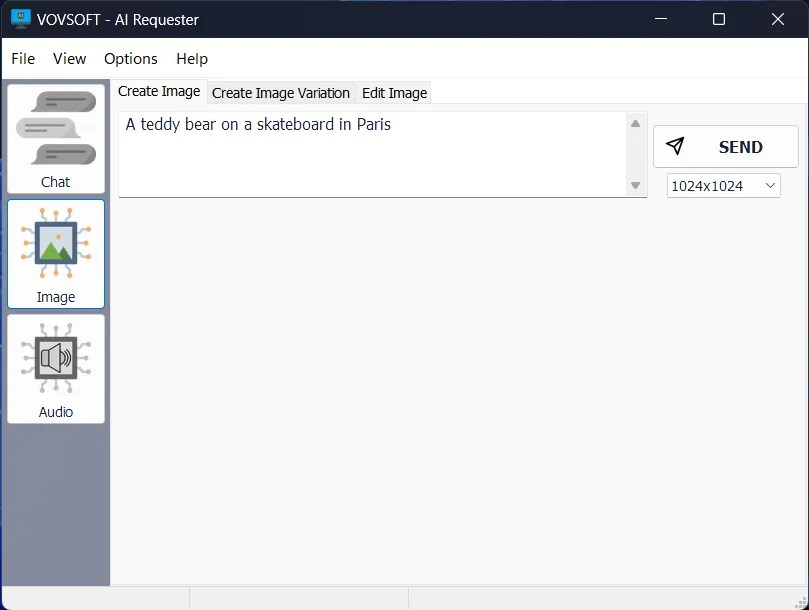
VovSoft AI Requester leverages the advanced capabilities of OpenAI’s DALL-E technology, developed for image integration in addition to text-based interactions. Users can use this feature to create high-quality images by providing text captions or feedback. The software supports various image sizes such as 1792×1024, 1024×1792, 1024×1024, 512×512, and 256×256, offering flexibility for various applications.
VovSoft AI Requester further expands its capabilities and seamlessly integrates audio elements into an AI-based experience. Users can input audio files with artificially generated natural voices, convert speech to text, and convert text to MP3 files. This audio integration adds a dynamic layer to user interaction, contributing to a more immersive and versatile AI experience.
FEATURES OF VOVSOFT AI REQUESTER
OPENAI API INTEGRATION
This feature allows you to directly connect to OpenAI’s chat completion, text completion, and visual endpoints using your private API key, and supports advanced models such as GPT-4o, GPT-4-Turbo, GPT-3.5-Turbo, and DALL·E 3 for text generation, conversation, and image generation. Users can configure OpenAI-compatible endpoints, such as self-hosted servers running Llama, Mistral, or DeepSeek models via proxies such as Ollama or vLLM, to provide broad compatibility beyond the official OpenAI services. Full control over request parameters – including temperature, max p, max tokens, frequency/penalty, presence penalty, and stopping order – allows you to fine-tune the optimal output for tasks such as content development, code generation, or creative writing. Response rendering provides real-time typing effects, mimicking web chatbots while maintaining the efficiency of a desktop computer.
USER-FRIENDLY GUI
The graphical user interface replaces bulky command-line tools or browser extensions with a resizable chat window, a syntax-highlighted line editor, and instant response previews formatted in markdown or plain text. Real-time validation checks API keys and parameters before sending a request, preventing common errors like invalid JSON. Dark and light themes, customizable fonts, and panel layouts support long sessions for line engineers or writers. Built-in tools for copying responses to the clipboard, saving them to a file, or pinning favorite lines improve daily workflow. Keyboard shortcuts speed up actions like starting a new chat, clearing history, or sending a request, making AI interactions accessible to both novice and experienced users alike.
SEQUENCE MANAGEMENT TOOLS
Store, categorize, and label reusable line templates, system instructions, and conversation threads for quick access during testing or production deployments. Multi-turn context storage automatically preserves conversation history between sessions, perfect for role-playing scenarios or iterative improvements. Import and export functions handle JSON-formatted query sets for backup, team collaboration, or portability between devices. The Favorites panel allows for one-click loading of high-performance items, making it easy to A/B test scenarios such as small examples or thought chain structures. Integration with user/assistant role assignments ensures structured conversations and increases reliability for complex tasks such as summarization, translation, or data extraction.
IMAGE CREATION SUPPORT
DALL·E’s seamless integration supports text-to-image queries with aspect ratio (1:1, 16:9, etc.), quality level (standard/hd), style (bright/natural), and negative query options to enhance the output. Generated images appear alongside zoom, pan, and metadata views, showing results, query templates, and model variations. Batch processing allows for multiple variations from a single query, accelerating creative exploration for design, marketing, or prototyping. Direct export to PNG, JPG, or clipboard makes it easy to use directly in editors like Photoshop or Docs. Advanced parameters such as number of images (1-10) and size presets optimize API usage while minimizing overhead.
RESPONSE FEATURES
Automatic logging records the full request-response pair with timestamps, pattern details, token usage, and searchable TXT, JSON, or Markdown files for auditing and analysis. Streaming mode provides advanced output display with pause/resume capability for multiple sessions. Comprehensive error diagnostics explain issues such as rate limits, quota expiration, invalid keys, or network errors, including retry suggestions. A history browser lets you filter logs by date, pattern, or keyword, allowing you to quickly retrieve past successes. Bulk export tools aggregate sessions into reports, which is valuable for documentation, compliance, or performance benchmarking across different configurations.
SYSTEM REQUIREMENTS
- Supported OS: Windows 11/10/8.1/7
- Memory (RAM): 2 GB of RAM or more is required
- Hard Disk Space: 200 MB or more required