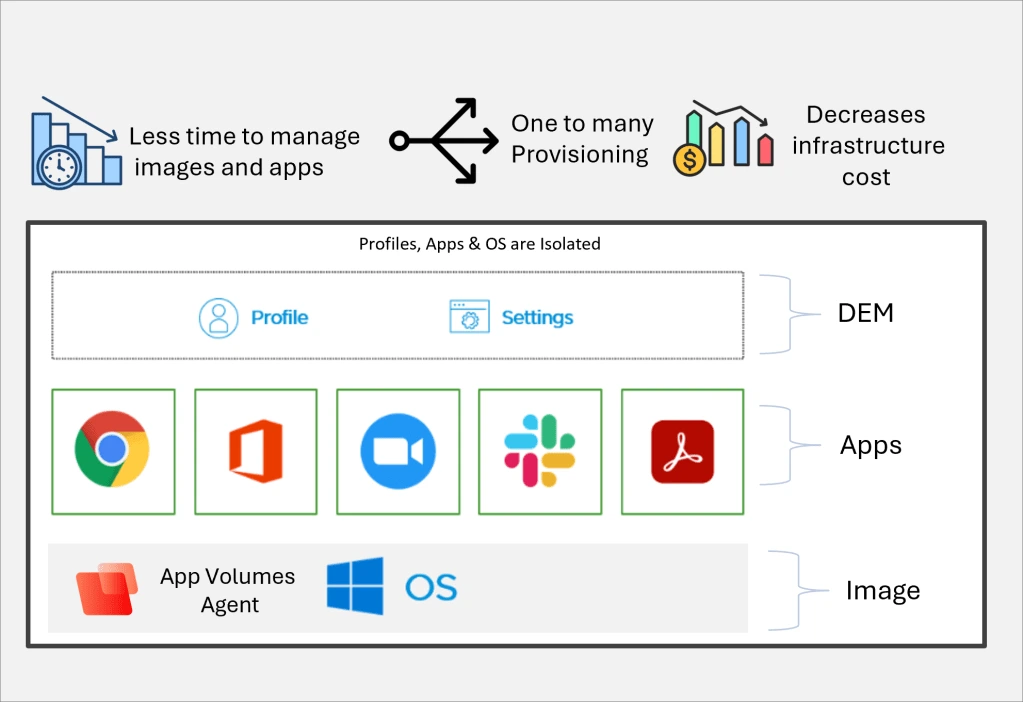

Omnissa ThinApp is an application virtualization solution that packages Windows applications into standalone executables without the need to install them on the host system. This isolates applications from the operating system, eliminating conflicts and simplifying deployment, updates, and management.
OVERVIEW OF OMNISSA THINAPP
Omnissa ThinApp is a leading application virtualization platform that enables organizations to package Windows applications as standalone executables. Instead of installing the software directly on a computer, ThinApp creates an isolated virtual environment that runs independently of the underlying operating system. This approach reduces application conflicts, reduces compatibility issues, and simplifies software deployment.
Designed primarily for enterprise IT environments, Omnissa ThinApp allows administrators to deploy applications without modifying the Windows registry or system files. Applications can be run from local drives, network shares, USB devices, or virtual desktop infrastructure (VDI), providing flexible access for users and reducing administrative costs.
ThinApp is particularly useful for preserving legacy applications that may not work properly on modern versions of Windows. By isolating applications from the operating system, organizations can continue to use critical business software while migrating to a new Windows environment.
The platform also simplifies application updates, testing, migration, and maintenance by enabling IT teams to manage portable application packages instead of traditional installations. Integration with enterprise management tools further simplifies software distribution across large organizations.
Whether used for desktop virtualization, remote work, software compatibility, or centralized application management, Omnissa ThinApp offers a reliable and efficient solution for delivering Windows applications securely and consistently.
FEATURES OF OMNISSA THINAPP
AGENTLESS APPLICATION VIRTUALIZATION
Omnissa ThinApp packages Windows applications into standalone executables that run without requiring installation or a client agent. Applications run in an isolated virtual environment, allowing users to run the software directly without modifying the host operating system.
APPLICATION ISOLATION AND COMPATIBILITY
ThinApp isolates applications from Windows registry entries, DLLs, and system files, preventing conflicts between different software versions. This isolation improves application compatibility and allows legacy business applications to continue running on newer Windows operating systems.
PORTABLE APPLICATION DEPLOYMENT
Virtualized applications can be distributed via network shares, USB drives, cloud storage, or enterprise deployment systems. Users can run applications without local installation, speeding up software deployment and reducing administrative effort.
SIMPLIFIED UPDATES AND MAINTENANCE
IT administrators can update packaged applications by replacing virtual packages instead of reinstalling the software on each device. This simplifies version control, reduces downtime, and ensures that users always have access to the latest, approved software.
ENTERPRISE MANAGEMENT AND SECURITY
ThinApp integrates with enterprise software management solutions to enable centralized deployment and policy-based management. Because applications remain isolated from the operating system, it reduces the risk of software conflicts and helps maintain a stable and secure computing environment.
LEGACY SOFTWARE SUPPORT
Organizations can continue to use legacy Windows applications that are no longer compatible with modern operating systems. ThinApp extends the life of critical business software, simplifies operating system migration, reduces redevelopment costs, and ensures business continuity.
SYSTEM REQUIREMENTS
- Supported OS: Windows 11/10/8.1/7
- Memory (RAM): 1 GB of RAM or more is required
- Hard Disk Space: 100 MB or more required