MiniTool Power Data Recovery Lite is a free data recovery software that can scan and recover files from various storage devices on Windows-compatible devices. It supports more than 100 file types, provides file preview, fast scanning, and various options for different needs.
OVERVIEW OF MINITOOL POWER DATA RECOVERY
MiniTool Power Data Recovery is a reliable and convenient data recovery solution for Windows-compatible devices. Developed by MiniTool Solution Ltd., this software meets the critical needs of recovering lost or deleted files from various storage devices including HDDs, SSDs, USB drives, and memory cards. The program’s versatility is highlighted by support for more than 100 file types, which provides a comprehensive approach to data recovery, including documents, images, videos, and various other formats.
One of the outstanding features of MiniTool Power Data Recovery is its intuitive interface, designed for users with varying technical backgrounds. The ease of use of the software is ensured by the file preview feature, which allows users to check the recoverable files before starting the recovery process. This preview feature not only adds a layer of trust to the recovery process but also allows for selective recovery, allowing users to get only the information they need. The software uses fast scanning algorithms, which play an important role in efficient data retrieval.
This quick scanning capability allows you to quickly identify lost or deleted files, reducing the time it takes to initiate the recovery process. If users have accidentally deleted or lost formatted drives or partitions, MiniTool Power Data Recovery offers a complete set of tools and options to address various data loss scenarios. MiniTool Power Data Recovery’s adaptability is further emphasized by offering a variety of recovery options, allowing users to customize the recovery process to suit their needs. Whether it’s a quick scan of recently deleted files or an in-depth scan for more complex data loss scenarios, the software meets a wide range of requirements.
FEATURES OF MINITOOL POWER DATA RECOVERY
FAST AND DEEP DATA SCANNING
MiniTool Power Data Recovery Lite provides scanning tools to find deleted or inaccessible files on supported storage devices. Fast scanning helps identify recently deleted data, while deep scanning methods help to more accurately find recoverable files when the original file system information is damaged or unusable.
RECOVER DELETED FILES
This software is designed to help you recover files that have been accidentally deleted from storage devices. This can be useful for deleting files from the Recycle Bin or other common operations. Users can scan the selected disk or partition and preview the detected files before attempting to recover them.
SUPPORT VARIOUS STORAGE DEVICES
MiniTool Power Data Recovery Lite can work with various types of storage devices depending on the supported Windows version and edition. Typical use cases include internal hard drives, SSDs, USB flash drives, memory cards, and other recognized storage devices. This provides flexibility when recovering files from different sources.
FILE PREVIEW AND SELECTIVE RECOVERY
Before recovery, users can preview the detected files and select the ones they really need. The preview function helps determine whether the file is recoverable and reduces unnecessary recovery attempts. Selective recovery is useful when only specific documents, photos, videos and other files need to be recovered.
PARTIAL FILE SYSTEM RECOVERY
This software helps find recoverable data from hard-to-access partitions and storage devices. Scanning identifies files based on file system information or recoverable data structure, providing data recovery options when traditional access methods fail.
SIMPLE RECOVERY WORKFLOW
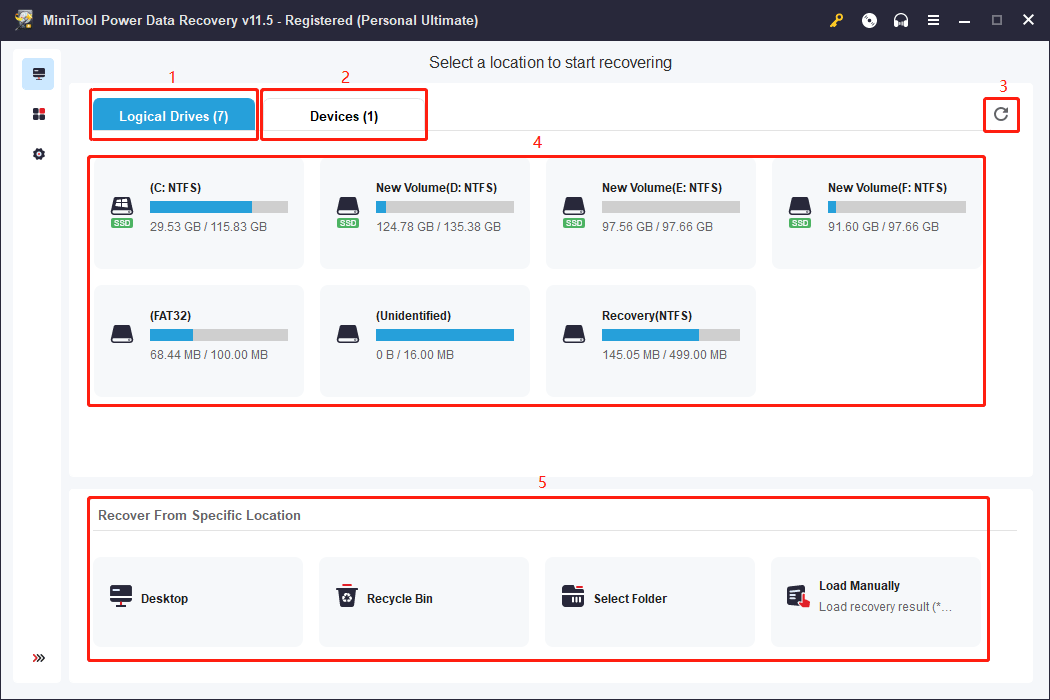
MiniTool Power Data Recovery Lite uses a simple recovery process designed to enable less experienced users to recover data. Users can select a storage location, scan for recoverable files, review the results, and select the items they need to recover. The simple interface helps users perform common recovery tasks without complicated settings.
SYSTEM REQUIREMENTS
- Supported OS: Windows 11/10/8.1/7
- Memory (RAM): 1 GB of RAM or more is required
- Hard Disk Space: 100 MB or more is required