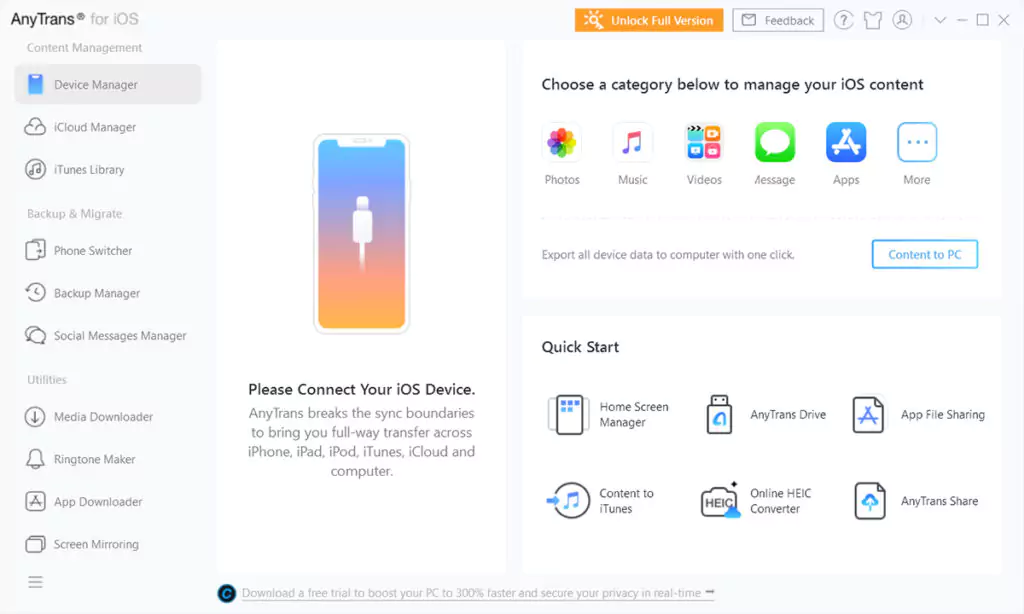

iMobie AnyTrans for iOS is a complete software tool for managing, transferring, and backing up data on iOS devices. iMovie is a software company that specializes in solutions for both iOS and Android users. AnyTrans for iOS is designed for users of Apple iOS devices such as iPhones, iPads, and iPods.
OVERVIEW OF IMOBIE ANYTRANS FOR IOS
iMobie AnyTrans for iOS is a comprehensive user-friendly file management solution for Apple devices such as iPhones, iPads, and iPods. AnyTrans, a versatile alternative to iTunes, allows users to seamlessly and efficiently manage various types of files on their iOS devices. The software’s core functionality focuses on data transfer, management, and backup, providing users with a flexible and intuitive platform to control the content of their devices.
One of the outstanding features of AnyTrans is its ability to help transfer and manage iOS data with speed and flexibility. Users can easily move and organize a variety of data types, including music, photos, videos, contacts, messages, and apps, creating a seamless and simplified approach to content management.
As part of media management, AnyTrans offers users the ability to transfer music across multiple devices for convenient and personalized listening on iPhone, iPad, iPod, computer, and iTunes. The software allows users to add music from a variety of computers without deleting existing tracks, offering unparalleled flexibility in creating and maintaining music libraries.
The software emphasizes the management of messages and attachments, recognizing their importance beyond text. Users can back up and print messages and attachments with one click to save precious memories or important information. AnyTrans covers all message attachments, including images, videos, music, soundtracks, Animoji, Memoji, Emoji stickers, and more.
FEATURES OF IMOBIE ANYTRANS FOR IOS
ALL-IN-ONE IOS DEVICE MANAGER
iMobie AnyTrans for iOS is a comprehensive software solution for managing, transferring and backing up content on iPhone, iPad and iPod devices. Unlike traditional iTunes management, AnyTrans provides a more flexible, fast and intuitive interface for managing music, videos, photos, apps, messages, contacts and other data. It allows users to seamlessly transfer files between iOS devices, computers, iTunes and even cloud storage services. This makes it a convenient tool for users who want to fully control their iOS ecosystem without the limitations of Apple’s core tools.
TRANSFER DATA BETWEEN DEVICES
One of the key features of AnyTrans for iOS is its ability to transfer data between iOS devices and between iOS devices and computers. Users can move photos, music, videos, messages, contacts and more with just a few clicks. Unlike traditional backup methods that require restoring the entire device, AnyTrans allows selective transfer, so users can copy only the data they need. The software supports cross-platform transfer, making it easy to transfer data from Android to iOS devices, which is especially useful for users switching ecosystems.
ITUNES AND ICLOUD INTEGRATION
AnyTrans provides enhanced iTunes and iCloud management capabilities. It allows users to export, import, and back up iTunes libraries without any limitations, and even extract individual files from iTunes backups. In addition, AnyTrans manages iCloud content such as photos, contacts, calendars, and files, allowing users to sync and download cloud data directly to their devices or computers. This integration makes AnyTrans a one-stop solution for efficiently managing local and cloud-based iOS data.
BACKUP, RESTORE, AND CLONE IOS DEVICES
AnyTrans for iOS offers reliable backup and restore tools, giving users peace of mind that their data is safe. You can quickly create full or incremental backups without overwriting the content on your existing device. Users can selectively restore specific files or all backups, eliminating the need to completely restore the device. The software supports device cloning, which allows you to transfer all content from one iOS device to another, keeping all apps, settings, and data intact, which is convenient when upgrading to a new iPhone.
MEDIA MANAGEMENT AND CUSTOMIZATION
AnyTrans excels in managing media files such as music, videos, and photos. Users can import and export media files in multiple formats without compatibility issues, create playlists, automatically convert video formats, and organize photos into albums. The software also provides access to system-level app data, ringtones, and documents, giving users complete control over the content on their devices. This feature is especially useful for content creators, music enthusiasts, or anyone who wants to efficiently organize and customize their iOS media library.
PHONE SCREEN AND DEVICE MANAGEMENT
AnyTrans includes tools to mirror iPhone screen to computer and remotely manage device settings. Users can view, export, and print messages, call logs, and contacts directly from their computers. It also supports application management, allowing you to install, uninstall, and backup applications without using the App Store. These features make AnyTrans a complete device management solution that combines data transfer, content organization, and device management on one platform.
USER-FRIENDLY INTERFACE, HIGH-SPEED PERFORMANCE
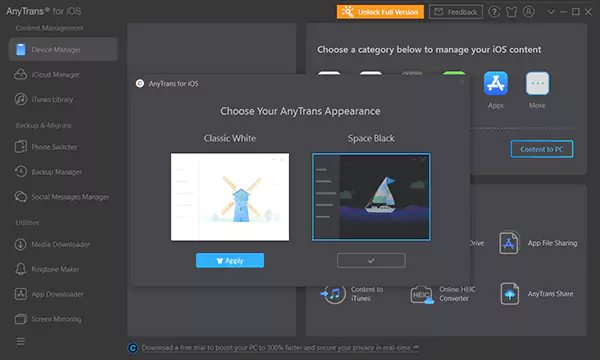
Designed with simplicity and speed in mind, AnyTrans has a simple, intuitive, and intuitive interface that is easy for both beginners and advanced users to use. The software uses fast transfer technology to transfer data between devices at high speed and without compromising quality. The lightweight design has minimal impact on system resources, making it effective for continuous use when managing or backing up data.
SAFE AND RELIABLE
AnyTrans keeps all transfers and backups secure, protecting user privacy and data integrity. The software maintains the original file quality during the transfer and avoids overwriting existing content unless explicitly authorized. Regular updates and compatibility with the latest iOS versions make AnyTrans a reliable solution for ongoing iOS management.
SYSTEM REQUIREMENTS
- Supported OS: Windows 11/10/8.1/7
- Memory (RAM): 1 GB of RAM or more is required
- Hard Disk Space: 100 MB or more required