

Foxit PDF Editor Pro is a complete software tool for editing PDF files. It offers users extensive options for managing and modifying PDF documents, including editing text, images, and pages, adding annotations, captions, and digital signatures.
OVERVIEW OF FOXIT PDF EDITOR PRO
Foxit PDF Editor Pro is a rich software designed to meet the requirements of accurate and efficient editing of PDF files. It stands out as an all-in-one solution for individuals and businesses who want to easily manage and modify PDF documents. Basically, Foxit PDF Editor Pro offers a versatile tool that includes a wide range of editing capabilities. Users can easily modify text, images, and pages within a PDF document to customize the content to meet specific requirements.
One of the standout features of Foxit PDF Editor Pro is its intuitive interface for both novice users and seasoned professionals. The software’s user-friendly design allows people of all skill levels to seamlessly navigate the editing process, reducing the learning curve and increasing productivity.
In addition to basic editing features, Foxit PDF Editor Pro provides additional annotation and collaboration tools. Users can add comments, annotations, annotations, and digital signatures to PDF documents to collaborate and review documents. These features streamline communication and feedback, allowing multiple stakeholders to easily contribute to the editing process.
In addition, Foxit PDF Editor Pro prioritizes security and compliance and offers strong encryption and security features to protect sensitive information. Users can encrypt PDF files, restrict access to specific individuals or groups, and apply digital signatures to verify document authenticity. These security measures ensure that confidential information remains protected throughout the editing and sharing process.
FEATURES OF FOXIT PDF EDITOR PRO
PDF CREATION & CONVERSION
Create PDF files directly from Microsoft Office files, web browsers, scanners, or images using one-click tools. Convert PDF files to Word, Excel, PowerPoint, RTF, TXT, or image formats such as JPEG and TIFF, preserving the original layout and fonts. Batch conversion saves time when processing multiple documents at once, saving you time on content creation or high-volume IT documentation tasks.
TEXT & OBJECT EDITING
Edit text directly within a PDF file with spell-checking, font adjustments, and style adjustments like a text editor. Edit, resize, crop, or replace images and vector objects. Dynamically reflow text for optimal reading on any device, and handle hyperlinks or multimedia insertion without loss of quality.
OCR & SCANNING
Perform high-resolution OCR on scanned paper or images to create searchable, editable text overlays. Batch correct OCR errors on pages for accuracy. Integrate with TWAIN-compliant scanners for live image capture and automatic enhancement, quickly converting physical documents into versatile digital files.
MARKUP AND ANNOTATE
Use highlighters, underlines, lines, sticky notes, text boxes, stamps, arrows, and hand-drawn images with customizable color and transparency. Record audio notes or attach files for detailed feedback. Export markup as FDF/XFDF summaries to support simplified team feedback.
FORM FILLING AND CREATION
Fill interactive forms with auto-detection of fields, drop-down menus, and checkboxes. Design new forms from scratch or from templates using JavaScript for calculations, validation, and dynamic behavior. Import/export data in XML or CSV format, perfect for research, invoicing, or compliance reporting.
SECURITY & SIGNATURE
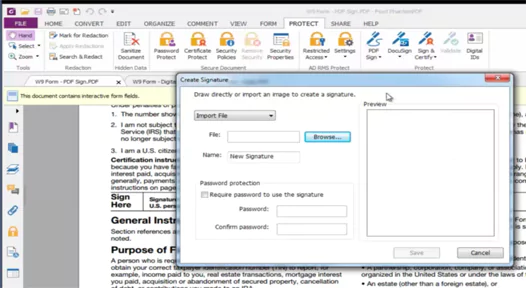
Use 256-bit AES encryption, password protection, and permissions to restrict printing or editing. Permanently erase sensitive text or images with blackout. Add legally valid digital signatures, timestamps, and certificates, including DocuSign cloud signatures, for secure authentication.
COLLAPSION TOOLS
Share password-protected links for real-time comments and version-controlled online reviews. Compare two PDF files side by side to highlight differences. The multi-tabbed interface lets you search and navigate open documents simultaneously, increasing productivity.
BETTER VIEWING AND ACCESSIBILITY
Enable text-to-speech with customizable speed and voice recognition. Use reflow, night mode, and zoom for comfortable viewing. Perform full accessibility checks according to PDF/UA standards, and run measurement tools and magnifiers for detailed inspection.
SYSTEM REQUIREMENTS
- Supported OS: Windows 11/10/8.1/7
- Memory (RAM): 1 GB of RAM or more is required
- Hard Disk Space: 400 MB or more required