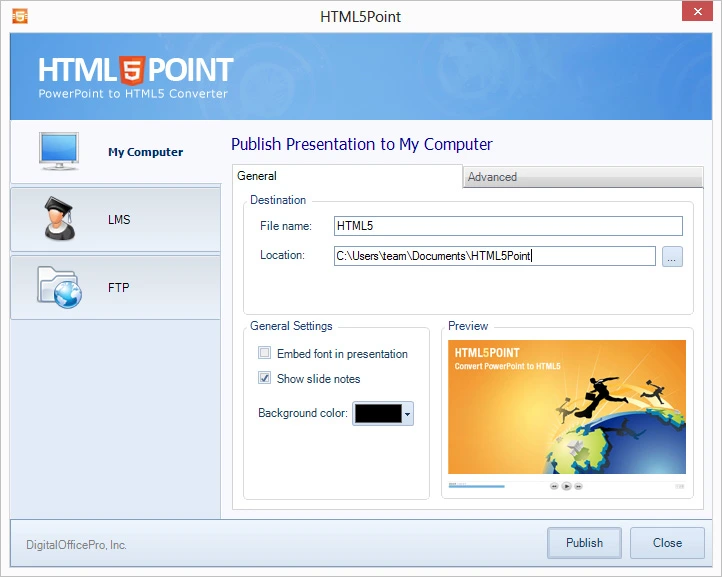

DigitalOfficePro HTML5Point is a tool that converts PowerPoint presentations into HTML5 format. It’s crafted to turn your Microsoft PowerPoint slides into engaging, web-ready content. With this tool, you can publish your presentations so they’re accessible on various browsers and devices, all without needing PowerPoint installed on the viewer’s machine.
OVERVIEW OF DIGITALOFFICEPRO HTML5POINT
DigitalOfficePro HTML5Point offers a robust solution for converting and publishing presentations. It takes Microsoft PowerPoint files and turns them into HTML5 content. This tool is ideal for a variety of users—organizations, educators, trainers, businesses, and content creators alike—who want to share PowerPoint presentations via web browsers and on modern devices.
With this software, you can easily transform your existing slides into engaging HTML5 presentations. The best part? Many original elements remain intact. Depending on what’s in your PowerPoint and how you set the conversion options, you can keep animations, transitions, images, audio, video, hyperlinks, and other interactive features.
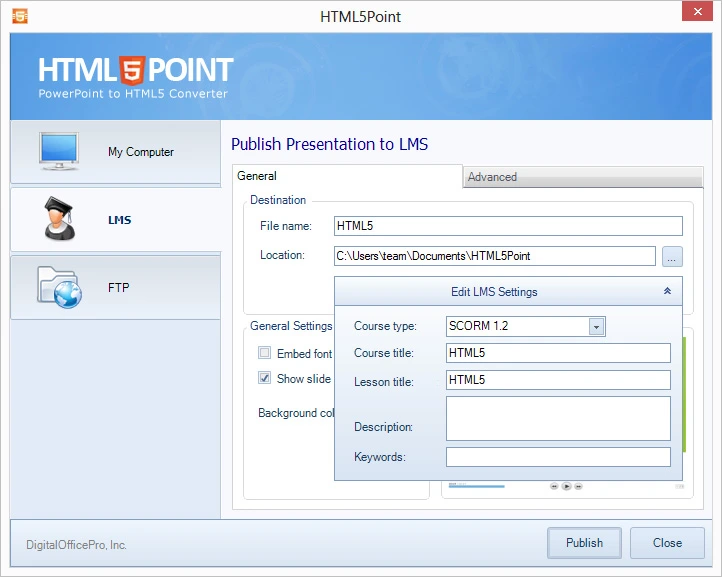
HTML5Point is handy for various uses. Think e-learning courses, employee training sessions, product demos, and online presentations. It also fits well with educational materials and corporate communications. By converting presentations to HTML5, you can publish content more easily on websites, learning management systems, intranets, and other online platforms.
The goal here? To minimize the need to start from scratch with existing presentations when delivering them online. Users can take those familiar PowerPoint files and transform them into content that works seamlessly in browsers. Plus, the publishing and customization options give you more control over how your presentations reach your audience.
FEATURES OF DIGITALOFFICEPRO HTML5POINT
CONVERT POWERPOINT TO HTML5
HTML5Point is primarily designed to convert PowerPoint presentations to HTML5 content. Users can work with existing PowerPoint files instead of having to recreate presentations from scratch. The conversion process prepares presentation materials for delivery through modern web browsers and compatible devices.
MULTIMEDIA SUPPORT
The software can preserve multimedia elements included in PowerPoint presentations. Depending on the source presentation and supported PowerPoint features, users can publish content that includes images, audio, video, animations, transitions, and other presentation elements. This helps preserve the visual and interactive nature of the original presentation.
INTERACTIVE PRESENTATIONS
HTML5Point can convert static PowerPoint slides into browser-based presentations with interactive navigation and presentation controls. This makes the converted content suitable for online training, educational materials, presentations, and business presentations where the presentation needs to interact with the slide-based content.
CROSS-PLATFORM WEB PUBLISHING
The output is based on HTML5 technology, so the converted presentation can be accessed on all viewing devices through a compatible web browser, rather than requiring Microsoft PowerPoint. This makes it easy to distribute the presentation through websites, internal portals, learning platforms, and other online environments.
E-LEARNING AND TRAINING
HTML5Point can be used to convert PowerPoint-based training materials into online learning content. Teachers and corporate trainers can reuse existing presentations as browser-based training, employee training, educational lessons, and instructional materials. This can save time when adapting existing presentation content for online distribution.
CUSTOMIZATION AND PUBLISHING OPTIONS
The software provides publishing controls that allow users to modify aspects of the converted presentation before distribution. Depending on the version, users can customize the presentation’s behavior, navigation, appearance, and output settings. These options provide greater control over how the final HTML5 content is delivered to the audience.
SYSTEM REQUIREMENTS
- Supported OS: Windows 11/10/8.1/7
- Memory (RAM): 1 GB of RAM or more is required
- Hard Disk Space: 100 MB or more required