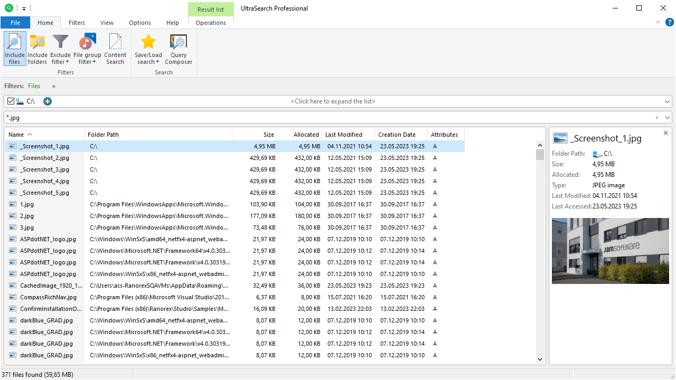
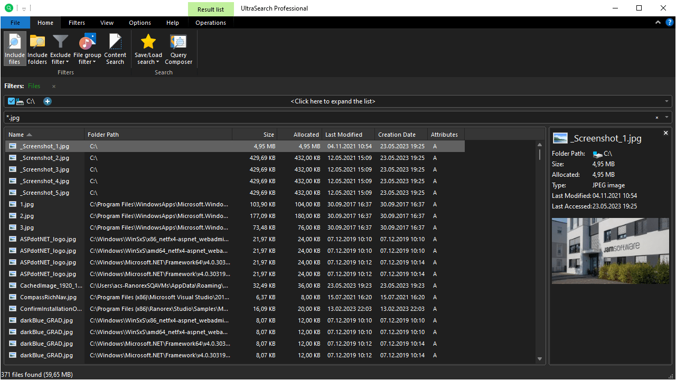

UltraSearch Professional searches files and folders on local NTFS drives and displays search results in seconds. This program does not work with indexes stored on the hard disk but works at high speed by working directly with the main file table (MFT) of NTFS partitions. It can also define hard links in NTFS.
OVERVIEW OF ULTRASEARCH PROFESSIONAL
UltraSearch Professional is an advanced file search tool designed to simplify searching for files and folders on local NTFS drives. Unlike traditional search tools that rely on indexing systems stored on hard drives, It uses an alternative method that works directly with the Master File Table (MFT) of NTFS partitions. This unique method allows UltraSearch Professional to deliver search results in seconds, bypassing the time-consuming indexing process and providing quick access to files.
One of the main advantages of UltraSearch Professional is its exceptional speed and efficiency. By clicking on MFT of NTFS partitions, the program quickly scans huge amounts of data, allowing users to find specific files or folders at an unprecedented speed. This fast search capability is especially useful for professionals and organizations working with large amounts of data where time is of the essence.
The Software offers a variety of advanced features to enhance your search experience. It allows users to define hard links within NTFS, thereby better understanding and managing complex file structures. This feature is more useful for users working with interconnected files and directories, allowing for more efficient organization and retrieval of data.
Another notable aspect of UltraSearch Professional is its intuitive interface which makes it easy for users to manage and modify search queries. The program offers various filter options, allowing users to refine their search based on file characteristics such as size, modified date, and file type. In addition, It supports wildcard searching, allowing users to search files based on partial or pattern-matching criteria.
For convenience, It is designed for NTFS drives and allows integration with Windows operating systems. Whether users are searching for documents, images, videos, or other types of files, It offers a comprehensive solution for fast and accurate data access and retrieval.
Overall, UltraSearch Professional stands out as a powerful and efficient file search tool that offers unmatched speed, advanced features, and a user-friendly interface. Used by private professionals or organizations, It is an essential tool for optimizing file management and recovery workflows.
FEATURES OF ULTRASEARCH PROFESSIONAL
LIGHTNING-FAST SEARCH PERFORMANCE
UltraSearch Pro is known for its incredible speed, allowing users to search for files and folders on local NTFS drives. Unlike traditional search tools that perform indexing, UltraSearch Pro works directly with the Master File Table (MFT) of NTFS partitions. This approach dramatically reduces search time, even on drives with millions of files. Whether you are looking for a specific document, image, or multimedia file, UltraSearch Pro delivers results in seconds, making it one of the fastest search tools available for Windows users.
ADVANCED FILTERING OPTIONS
UltraSearch Pro offers a variety of filtering options to help users effectively narrow down their search results. You can filter by file type, size, date modified, or even simple expressions using complex expressions. This flexibility allows you to identify the files you need without having to sift through hundreds or thousands of irrelevant results. In addition, the software supports combining multiple filters, which is especially useful for power users who manage large amounts of data.
REAL-TIME SEARCH UPDATES
One of the standout features of UltraSearch Pro is its ability to provide real-time search updates. As files are added, modified, or deleted on your NTFS drives, UltraSearch Pro dynamically updates its search results to reflect those changes immediately. This means you always have access to the latest file information without having to manually refresh searches or rebuild the index.
USER-FRIENDLY INTERFACE
UltraSearch Pro comes with a clean, easy-to-navigate interface designed for both novice and advanced users. The main window is structured to display search results in a clear, tabular format, and displays detailed information such as file path, size, and last modified date. Users can quickly sort, group, or preview files within the interface. Furthermore, the software supports context menus and integration with Windows Explorer, allowing users to perform actions such as opening, copying, moving, and deleting files directly from search results.
EXPORT AND REPORTING CAPABILITIES
For users who need to track large data sets, UltraSearch Pro offers robust export options. Search results can be exported to a variety of formats, including CSV, TXT, and XLS, making it easy to generate reports or share file information with colleagues. This is valuable for IT professionals, archivists, or businesses managing extensive digital libraries, as it allows for quick documentation and auditing of file resources.
CUSTOMIZABLE SEARCH SETTINGS AND INTEGRATIONS
UltraSearch Pro offers a high level of customization to suit user preferences. You can change search parameters, define the default search location, and even configure the software to run in portable mode without installation. It integrates well with other Windows tools and allows you to perform batch actions on search results via context menu extensions and context menu extensions. These features make UltraSearch Pro a versatile and powerful tool for personal and professional file management tasks.
SYSTEM REQUIREMENTS
- Supported OS: Windows 11/10/8.1/7
- Memory (RAM): 1 GB of RAM or more is required
- Hard Disk Space: 100 MB or more required