MobaXterm Professional is an advanced terminal software tool for Windows PCs. It is intended for system administrators, developers, and IT professionals who need remote access to Unix/Linux systems or use various networking tools.
OVERVIEW OF MOBAXTERM PROFESSIONAL
MobaXterm Professional is a comprehensive portable networking application designed to empower IT professionals, system administrators, and developers with powerful tools for efficient remote computing on Windows systems. MobaXterm provides a secure and stable environment and ensures reliable connections to remote servers. The inclusion of an X11 server sets it apart, allowing users to seamlessly run graphical applications from Unix/Linux servers, thereby facilitating a consistent and unified cross-platform experience.
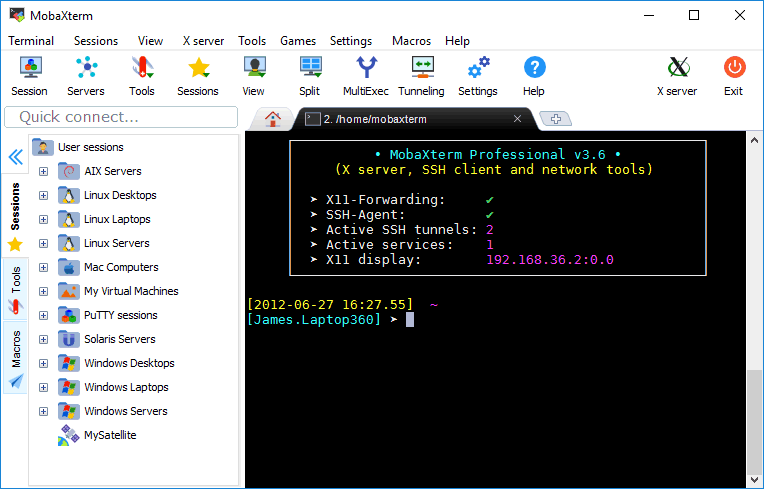
One of the features is a built-in SSH client that ensures a secure shell connection for remote access. The program goes beyond basic functionality and offers a wide range of network tools and Unix commands, from file transfers to network diagnostics. A tabbed terminal interface and convenient session management further improve user productivity, enable efficient multitasking, and streamline workflow.
MobaXterm Professional focuses on security, making it the ideal choice for organizations and professionals working with sensitive data. The portable nature of the application allows users to transfer their work environment to a USB drive, providing flexibility and convenience without having to install it on each machine. The professional version of MobaXterm introduces advanced features and customization options, tailoring the experience to the unique needs of power users. With a focus on user-friendly design, the program has an integrated text editor with syntax highlighting, macros, and advanced features.
FEATURES OF MOBAXTERM PROFESSIONAL
TABLED TERMINAL WITH SSH
MobaXterm Professional offers a robust tabbed terminal interface based on PuTTY that supports SSH, Telnet, Rlogin, RDP, VNC, XDMCP, FTP, SFTP and Serial connections, allowing users to efficiently manage multiple remote sessions in a single window. Sessions are automatically saved and listed in the sidebar, allowing for quick access, reconnections, and simplifying the workflow of system administrators and developers managing various remote environments. This feature eliminates the need for multiple standalone tools, and provides antialiased fonts, macro support, and smooth tab switching to increase productivity in daily remote operations.
GRAPHICAL SFTP BROWSER
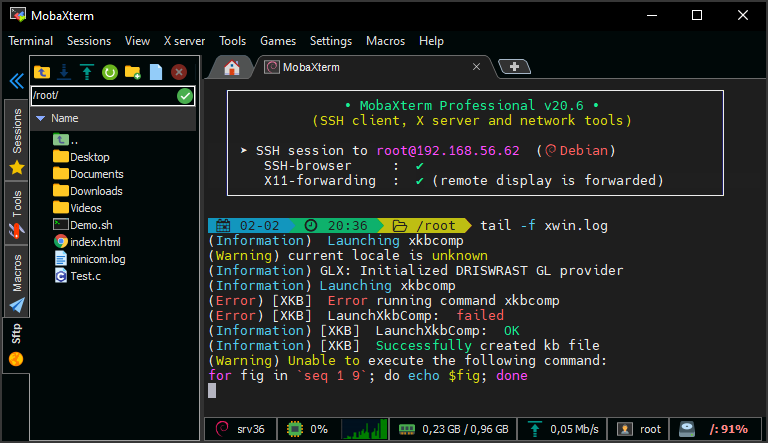
When you initiate an SSH connection, a graphical SFTP browser automatically appears in the left sidebar, allowing for secure drag-and-drop file transfers between local Windows machines and remote servers without additional software. Users can navigate through remote directories synchronized with the terminal location, edit files directly with a double-click via the integrated MobaTextEditor, and securely handle large file operations over encrypted channels. This integration simplifies file management tasks and is essential for developers deploying code or administrators deploying configurations over a network.
A RETAINED X11 SERVER
The X server, powered by X.org, supports X11 streaming and eliminates the need to manually set the DISPLAY variable to easily display remote graphical applications on a local Windows computer. It includes advanced extensions such as OpenGL, Composite, Randr, and the XDMCP protocol for accessing remote desktops on Unix-like systems such as Solaris. Professionals can safely run Linux graphical tools over SSH, ideal for engineering, scientific computing, or software development visualization tasks without compromising performance or security.
MULTI-EXECUTION CAPABILITIES
For efficient batch operations such as updates or diagnostics, use multi-execution tools to execute the same commands simultaneously on multiple remote servers, routing input to selected sessions. This “write once, run anywhere” approach saves IT teams time managing clusters or distributed systems, reducing repetitive typing and errors in large-scale environments. Combined with session grouping, it supports parallel processing of scripts or queries, improving scalability for enterprise-level management.
SSH CURRENT AND OUTPUT SUPPORT
Graphically create and manage SSH tunnels through an intuitive tool that includes SSH-gateway (jump host) functionality for secure access to protected servers and firewalls. Port forwarding and dynamic tunneling options encrypt traffic for protocols such as RDP or VNC, ensuring compliance on restricted networks. This feature is essential for secure access to internal resources and for storing reusable configurations in industries where compliance is critical.
PACKAGE MANAGER (MOBAPT)
The MobApt package manager works like apt-get, allowing you to download and install additional Unix tools directly into the MobaXterm environment without external dependencies. Users can extend the functionality with servers (e.g., TFTP, iPerf), utilities, or custom plugins, keeping the portable setup lightweight yet comprehensive. This on-demand extensibility meets the evolving needs of development, testing, and network diagnostics.
WELL-CUSTOMIZABLE AND SECURE
The Professional version allows you to brand the Customizer with a custom logo, default settings, welcome message, unlimited sessions, macros, and priority support. Passwords are protected by a master password, and logging and code syntax highlighting are available even on remote servers that are not encrypted. These enterprise-level options ensure customized, secure deployments for teams, including automation macro recording.
SYSTEM REQUIREMENTS
- Supported OS: Windows 11/10/8.1/7
- Memory (RAM): 2GB of RAM or more is required
- Hard Disk Space: 200 MB or more required