
ManicTime Pro is a powerful time tracking software for professionals and businesses. It automatically records computer usage, helps users analyze productivity, track billing time, and manage time more effectively. Detailed reporting, offline tracking, and integration options simplify time management without disrupting workflow.
OVERVIEW OF MANICTIME PRO
ManicTime Pro is a comprehensive and highly effective time tracking software designed to help individuals, freelancers, and businesses better understand and manage how they spend their time on the computer. Unlike traditional timekeepers that require manual entry, ManicTime Pro works silently in the background and automatically records usage data without interrupting the user’s workflow. This makes it particularly effective for users who want accurate, real-time information about their productivity without the hassle of constantly turning a timer on and off.
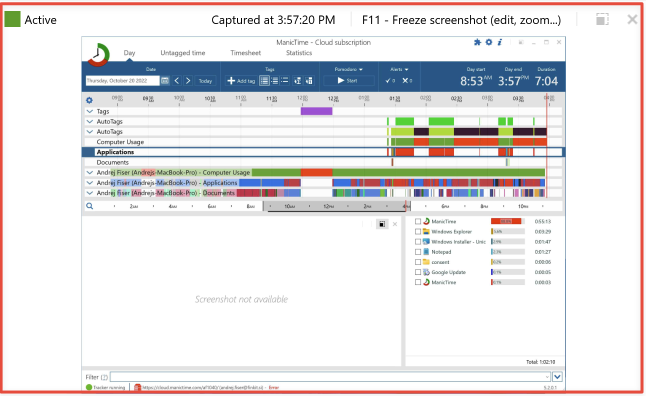
One of ManicTime Pro’s standout features is its automatic tracking capabilities. The software tracks which applications are being used, which websites are being visited, and how long each activity takes. This data is visually displayed through a time-based interface, giving users a snapshot of their daily activities. By analyzing these timesheets, users can identify inefficient habits, reduce time-wasting behaviors, and make informed decisions to optimize their workflow.
ManicTime Pro offers robust tagging and note-taking features. Users can mark time segments recorded with specific tasks, projects, or clients. This is especially useful for freelancers or professionals who need to keep a close eye on their billable hours. These tagged entries can be exported to customizable, easy-to-create detailed reports or timesheets. This level of detail makes ManicTime Pro a valuable asset for billing, payroll, and project management.
Privacy is another key benefit of ManicTime Pro. All data is stored locally on the user’s machine, ensuring that sensitive information is kept secure and only accessible to the user. This is especially important for users who work in regulated industries or who deal with sensitive information. In addition to privacy, the software works completely offline, allowing for continuous tracking even without an internet connection.
FEATURES OF MANICTIME PRO
AUTOMATIC TIME TRACKING
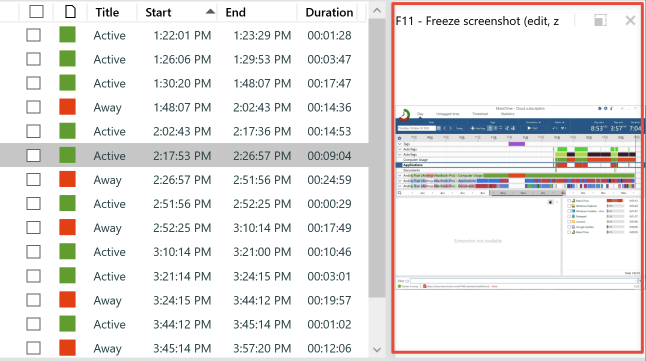
ManicTime Pro provides automatic time tracking that runs silently in the background and records all activities on your computer. It records the applications, documents, and websites you use with precise time stamps. This eliminates the need for manual input and allows for accurate timekeeping. The software provides a detailed timesheet of your daily activities, helping users identify productivity patterns and manage their time more effectively.
DETAILED REPORTING AND ANALYTICS
The software provides comprehensive reporting tools that transform raw activity data into actionable insights. Users can view a summary of work hours, project duration, and application usage in customizable charts and graphs. ManicTime Pro lets you filter by date range, category, or project, giving professionals a clear view of how their time is being spent. These analytics help increase efficiency and support data-driven decisions to improve work-life balance.
PROJECT AND TASK TAGGING
ManicTime Pro allows users to tag recorded time segments to specific tasks or projects. This feature simplifies project-based billing, time tracking, and performance monitoring. Tagging can be done manually or automatically based on application usage to properly categorize work hours. The tagging system is ideal for freelancers, consultants, and teams who need to allocate time to multiple clients or activities.
OFFLINE FEATURES AND PRIVACY
One of the key advantages of ManicTime Pro is its full offline capabilities. All time tracking data is stored locally on the user’s device, ensuring privacy and data security. Unlike cloud-based solutions, users have full control over their data, eliminating concerns about unauthorized access or data loss. This makes the software ideal for professionals who work with sensitive or confidential information.
COMPREHENSIVE INTEGRATIONS AND TEAM FEATURES
ManicTime Pro integrates with a variety of productivity and project management tools, including Jira, Microsoft Teams, and Trello. Its server version allows teams to aggregate and analyze data from multiple users, allowing managers to track productivity and project progress. Integration with third-party software allows for seamless synchronization of work records and improved collaboration in business environments.
CUSTOMIZABLE INTERFACE AND PRODUCTIVITY TOOLS
ManicTime Pro’s user-friendly interface makes it easy to view timesheets, daily statistics, and manage recorded data. Users can customize dashboards, define work hours, and generate automated reports for clients or employers. Built-in reminders and idle time detection features help reduce time loss and build sustainable productivity. With its combination of automation, privacy, and flexibility, ManicTime Pro stands out as a comprehensive solution for personal and professional time management.
SYSTEM REQUIREMENTS
- Supported OS: Windows 11/10/8.1/7
- Memory (RAM): 1 GB of RAM or more is required
- Hard Disk Space: 200 MB or more required