
Auslogics SSD Optimizer is a Windows utility designed to increase the performance and lifespan of solid-state drives. It optimizes SSD settings, disables unnecessary system functions, and improves data access speed. The utility offers scheduled maintenance, TRIM support, and an easy-to-use interface, making it ideal for maximizing SSD efficiency.
OVERVIEW OF AUSLOGICS SSD OPTIMIZER
Auslogics SSD Optimizer is a software designed to increase the performance and lifespan of solid-state drives (SSDs). As SSDs replace traditional hard drives (HDDs) in consumer and business devices due to their high speed and reliability, maintaining their performance is becoming increasingly important. However, unlike HDDs, SSDs require different optimizations to perform at their best. This is where Auslogics SSD Optimizer comes in.
SSDs are built using flash memory chips, and their performance can degrade over time due to various factors, such as excessive read/write cycles, fragmentation, and wear and tear. In a typical usage scenario, data is constantly written and deleted, which can lead to fragmentation or unnecessary overwriting of data, which can slow down your SSD. Auslogics SSD Optimizer addresses these issues by offering an optimization process that improves the overall health and responsiveness of your SSD.
One of the key features of Auslogics SSD Optimizer is its automatic task management, which helps maintain drive efficiency. These tasks include optimizing free space, reducing unused files, and optimizing SSD read/write processes for the most efficient performance. It is important to note that unlike traditional HDDs, SSDs do not need to be defragmented in the same way. Defragmenting SSDs shortens their lifespan by unnecessarily increasing the number of write operations. Auslogics SSD Optimizer avoids this by using SSD-friendly methods.
The software is designed to provide a user-friendly experience for both novice and experienced users. For users who may not have a deep understanding of SSD technology, Auslogics SSD Optimizer takes the complexity out of SSD maintenance by automating the optimization process. It works in the background, checking for issues that may be slowing down the SSD, and performing maintenance when necessary. Users can choose to run the optimization process manually if they want more control over their operation, but the software’s automatic mode ensures optimal performance without any intervention.
FEATURES OF AUSLOGICS SSD OPTIMIZER
SSD HEALTH MONITORING
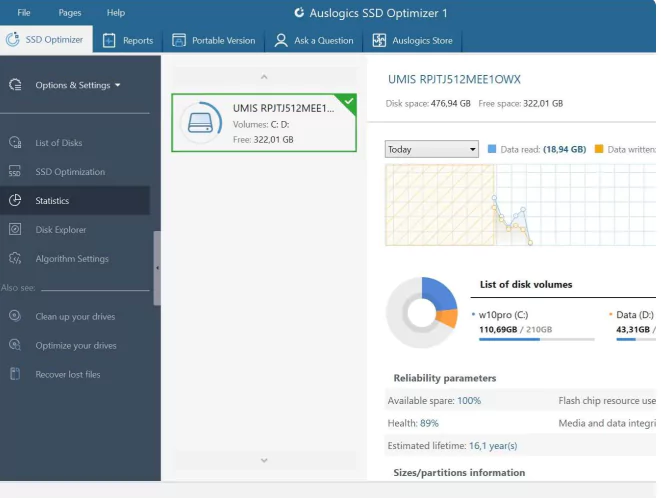
This feature provides comprehensive real-time information about the health of your SSD, including total read and write data, current health percentage, and estimated remaining life based on usage patterns. Users benefit from visual graphs and alerts about potential issues such as excessive wear or temperature spikes, allowing for proactive management to prevent data loss. It scans without impacting system speed, making it ideal for continuous monitoring during daily tasks.
ONE-TAP OPTIMIZATION
A simple button enables automatic SSD tuning, which safely moves fragmented data clusters and optimizes free space allocation to suit the flash memory architecture. This reduces read/write latency, increases boot times, and improves application loading speeds by up to 20-30% in benchmarks. This process reduces the overload of the TRIM command and ensures long-lasting performance without the traditional defragmentation that can damage SSDs.
DISK DOCTOR DIAGNOSTICS
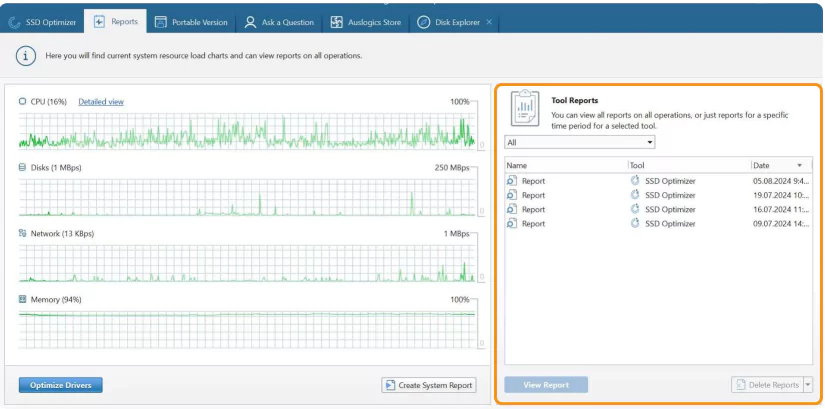
Built-in diagnostics detect and repair logical errors, bad sectors, and file system inconsistencies on your SSD using non-destructive methods. It provides detailed reports on partition health, S.M.A.R.T. attributes, and software compatibility, helping users identify hardware failures early. Regular scanning prevents crashes and data corruption, and has the option to automatically isolate problematic files.
SCHEDULED AUTOMATION
Configurable profiles for automatic optimization during idle periods, such as weekly or monthly, based on usage habits such as gaming or editing large files. It ensures stable operation without manual intervention, and integrates with Windows Task Scheduler to run smoothly in the background. Pro versions allow for priority settings to avoid peak-time interruptions.
DISK CLEANER VISIBLE
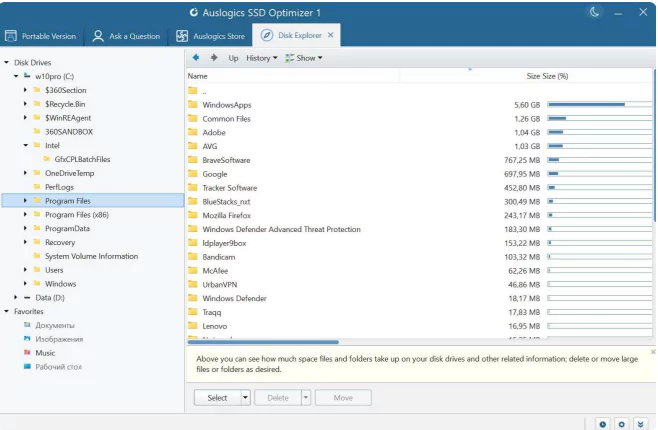
The intuitive interface shows a breakdown of disk usage by file type, size, and location, with interactive pie charts and tree maps to identify space hogs. Users can quickly delete or move large temporary files, duplicate files, or registry entries to easily reclaim gigabytes. It complements optimization by preventing fragmentation caused by uneven space allocation.
WARBAG CLEANER INTEGRATION
Pre-optimization cleanup targets temporary files, browser caches, and trash leftovers to reduce SSD wear and tear, freeing up space before large hits. It securely wipes free space to remove traces of deleted data and improves privacy without overwriting active files. Combined with optimization, it provides a comprehensive cleanup in less than 5 minutes.
PRO EXCLUSIVE IMPROVEMENTS
The paid version unlocks email notifications, secure deletion of entire drives, and advanced S.M.A.R.T. monitoring with algorithm customization for enterprise SSDs. It supports batch processing of multiple drives and exports detailed logs for technical analysis. These are advantages over the free tool for experienced users who need detailed monitoring.
SYSTEM REQUIREMENTS
- Supported OS: Windows 11/10/8.1/7
- Memory (RAM): 1 GB of RAM or more is required
- Hard Disk Space: 100 MB or more required