Abelssoft EverDoc is a user-friendly document management software designed to help individuals and businesses efficiently organize, archive, and access their digital documents. It supports a wide range of file formats, including PDFs, Word documents, images, and emails, and stores them in a centralized, searchable archive.
OVERVIEW OF ABELSSOFT EVERDOC
Abelssoft EverDoc is a comprehensive document management solution designed to make it easy to store, organize, and retrieve digital documents. Whether you’re managing personal paperwork or business-related files, EverDoc simplifies document processing by creating an accessible and secure centralized digital archive.
One of EverDoc’s standout features is its ability to automatically archive documents from a variety of sources. Users can import files directly from their computer or automatically pull documents from cloud storage services such as Dropbox, Google Drive, and OneDrive into the software. It also integrates with a virtual printer system, which means that documents “printed” using EverDoc are automatically stored and indexed in the system.
EverDoc supports a wide range of file formats, including PDF, Word, JPG, PNG, and email, allowing for compatibility with almost all common document types. A key advantage is its optical character recognition (OCR) feature that converts text content from image-based documents or scanned files into searchable data. This means that you can quickly find scanned documents or handwritten notes using a simple keyword search.
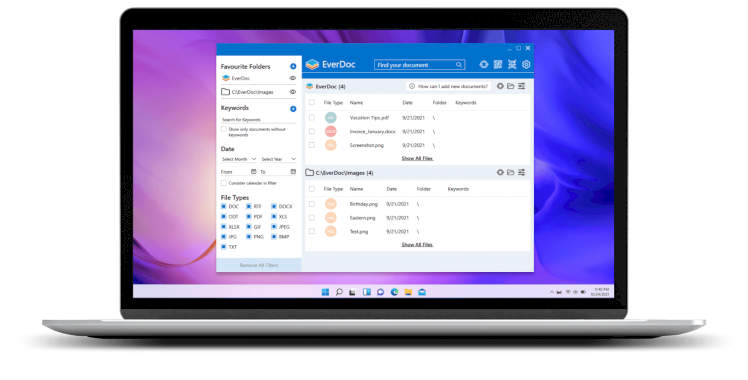
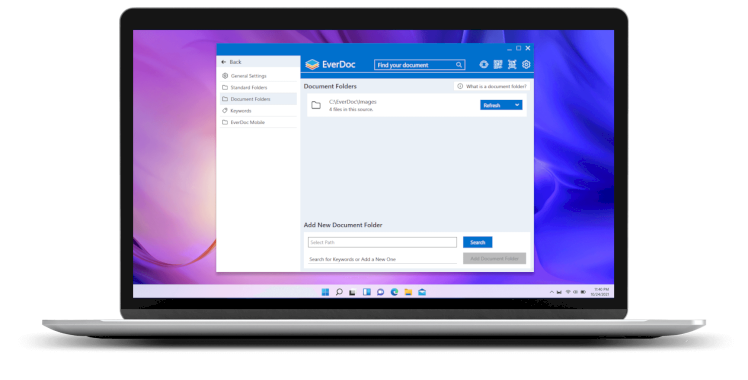
The intuitive user interface allows for easy navigation and document sorting. Users can tag documents with specific keywords, categorize them into folders, and assign dates and subjects for better organization. The search function is powerful and fast, allowing users to find documents even in large archives in seconds.
EverDoc is equipped with backup and restore functions, which play an important role in protecting valuable data. In the event of a system failure or data loss, users can create automatic backups and easily restore their archives. This adds an extra layer of security for personal and professional document management.
Privacy and security are emphasized throughout the software, with internal storage options and encrypted cloud support. For users concerned about keeping confidential information private, EverDoc offers the option to store all documents locally without relying on third-party servers.
Whether you’re organizing invoices, tax records, contracts, academic papers, or everyday personal documents, EverDoc offers a reliable and scalable solution. The combination of automation, OCR, smart search, and backup features makes it ideal for individuals, freelancers, and small businesses. Abelssoft EverDoc helps users easily and efficiently manage their digital documents by reducing paper clutter and improving information accessibility.
FEATURES OF ABELSSOFT EVERDOC
Auto-archive documents: EverDoc automatically archives documents (PDFs, images, Word files, etc.) from printers, email attachments, or dedicated folders.
Cloud Integration: It supports cloud services such as Dropbox, Google Drive, and OneDrive, allowing you to manage documents stored online.
Full-text search: Powerful full-text search helps you quickly find documents by keywords and phrases in the document content.
Tags and sorting: You can add tags and categorize your documents for easy retrieval and storage.
Preview function: The document viewer allows you to preview files (PDFs, images, etc.) without opening external applications.
Import from various sources: Easily import files from folders, scanners, or drag and drop them into EverDoc to archive.
Multi-user support: Allows multiple user profiles on the same system, which is ideal for shared computers or multiple accounts.
Backup and Restore: Built-in backup features help protect your document archives and restore data in the event of data loss.
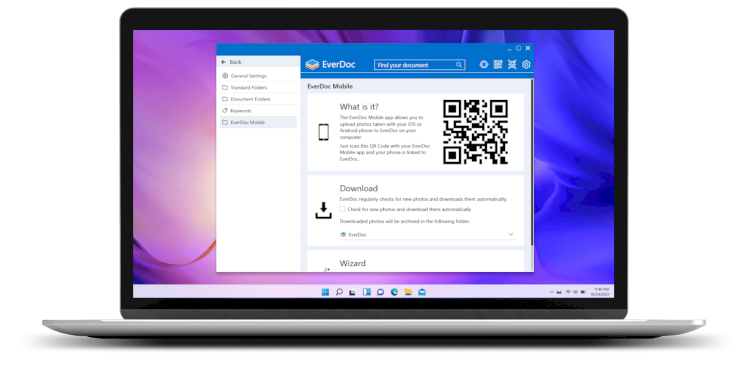
SCREENSHOTS
SYSTEM REQUIREMENTS
- Supported OS: Windows 11/10/8.1/7
- Memory (RAM): 1 GB of RAM or more is required
- Hard Disk Space: 100 MB or more required