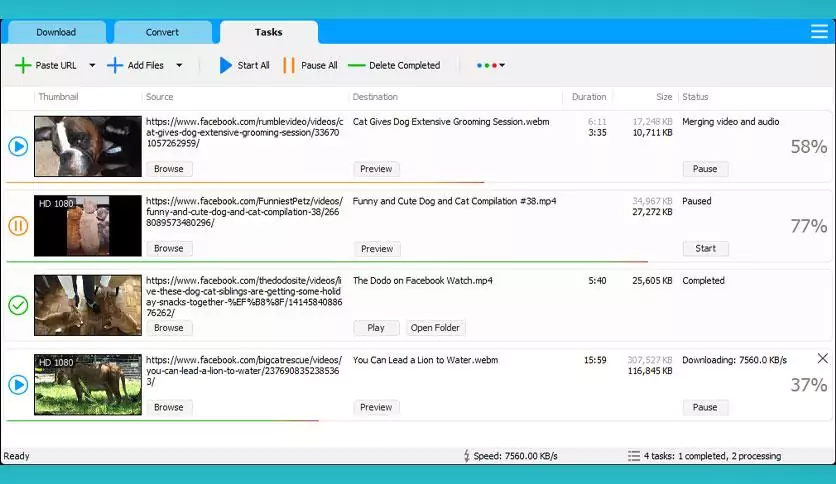
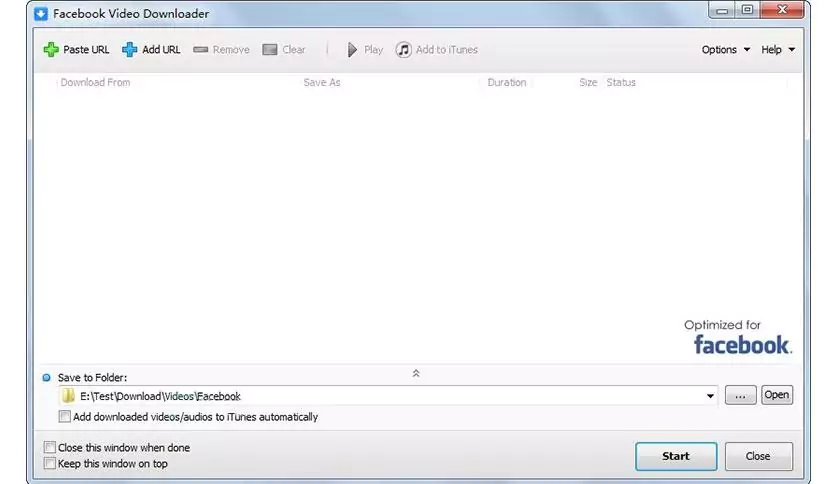
Social Video Downloader is a social media application program to quickly download high-quality video files from Facebook and other popular services. The program allows you to convert downloaded videos to AVI, MP4, WMV, MOV, 3GP, MPEG, DVD, or formats for portable devices like iPhone, iPad, iPod, PSP, Android, and the like. The program allows you to extract audio tracks from video files and convert them to popular audio formats.
OVERVIEW OF SOCIAL VIDEO DOWNLOADER
A Social Video Downloader is a software tool or an online service designed to allow users to download videos from various social media platforms. In an era where online video content has become a predominant form of communication, entertainment, and education. These downloaders offer a practical solution for users who want to save and access videos offline, share them with others, or reuse them. for creating your content. This overview explores the purpose, features, benefits, and considerations surrounding social video downloaders.
Social video downloaders are to give users the ability to save videos from social media platforms to their devices. This could include videos from platforms like YouTube, Facebook, Instagram, Twitter, TikTok, and more. While these platforms often provide an option to stream videos online, there are cases where users may prefer offline access, such as when Internet connectivity is limited or unstable.
Additionally, content creators and educators can use these downloaders to embed specific videos into their presentations or instructional materials. A Social Video Downloader is a valuable tool that adapts to the evolving ways in which people consume and interact with video content online. Addresses the need for offline access, content sharing, and educational apps.
However, users should keep legal and ethical considerations in mind when using such tools and remain vigilant about the sources they choose to download from. As the digital landscape progresses, social video downloaders are likely to continue to adapt and provide enhanced features to meet the changing needs of users.
FEATURES OF SOCIAL VIDEO DOWNLOADER
BROAD PLATFORM SUPPORT
Social Media Downloader is designed to help users save media content from multiple platforms, making it an essential tool for anyone who regularly consumes online content. It supports popular platforms such as Facebook, Instagram, Twitter (X), TikTok, and YouTube. With just a few clicks, users can download videos, photos, reels, stories, and even entire playlists, depending on the source. This broad platform compatibility eliminates the need for multiple tools and offers a unified solution for downloading content from various social media channels.
HIGH-QUALITY DOWNLOADS
One of the most valuable features of Social Media Downloader is the ability to choose the quality of the downloaded files. Users can choose from standard resolution for fast storage, or choose high definition (HD) or even 4K quality when available. This allows you to save videos and images in a specific way for offline viewing, presentations, and archiving. Audio extraction is often supported, allowing users to directly save background music or podcasts in MP3 or other formats. This flexibility allows for control over file size and quality depending on the user’s preferences and storage capacity.
BATCH DOWNLOADS AND PLAYLISTS
Efficiency is a key aspect of any downloader, and Social Media Downloader tools often offer a batch download option. Instead of saving files one by one, users can download multiple videos, images, and audio files at once. For platforms like YouTube or TikTok, the app supports playlist or channel downloads, allowing users to save entire collections with minimal effort. This great feature is a time-saver for content creators, researchers, or anyone else who needs to access social media.
BUILT-IN BROWSER AND LINK DETECTION
To simplify the process, many Social Media Downloader apps include a built-in browser or smart link detection feature. This automatically downloads media links that are copied to the clipboard or pasted into the app, making the download process quick and hassle-free. Users don’t have to deal with complicated URLs or third-party services; the downloader recognizes supported media right away. The built-in browser allows users to log in to their account and access private and restricted content, allowing them to save personal stories, posts, and videos that may not be publicly available.
FILE CONVERSION AND FORMATTING OPTIONS
In addition to just downloading, Social Media Downloader often offers file conversion tools. Videos can be converted to different formats, such as MP4, AVI, and MKV, while audio can be saved as MP3, AAC, or WAV. This makes the downloaded content compatible with a wide range of devices, from smartphones to media players. Conversion also reduces the file size and makes it easier to save and share without losing quality. The ability to choose a specific format provides maximum compatibility and convenience for various use cases.
EASY-TO-USE INTERFACE AND CUSTOMIZATION
A well-designed Social Media Downloader emphasizes ease of use and offers advanced features. Most tools have a clear interface, and users simply paste a link or click “Download” to start the process. Meanwhile, advanced users can use configuration options such as selecting a download folder, setting a naming convention, scheduling downloads, and using proxy settings. This combination of simplicity and control will appeal to professionals who want more flexibility while making the software accessible to beginners.
SYSTEM REQUIREMENTS
- Supported OS: Windows 11/10/8.1/7
- Memory (RAM): 1 GB of RAM or more is required
- Hard Disk Space: 100 MB or more required