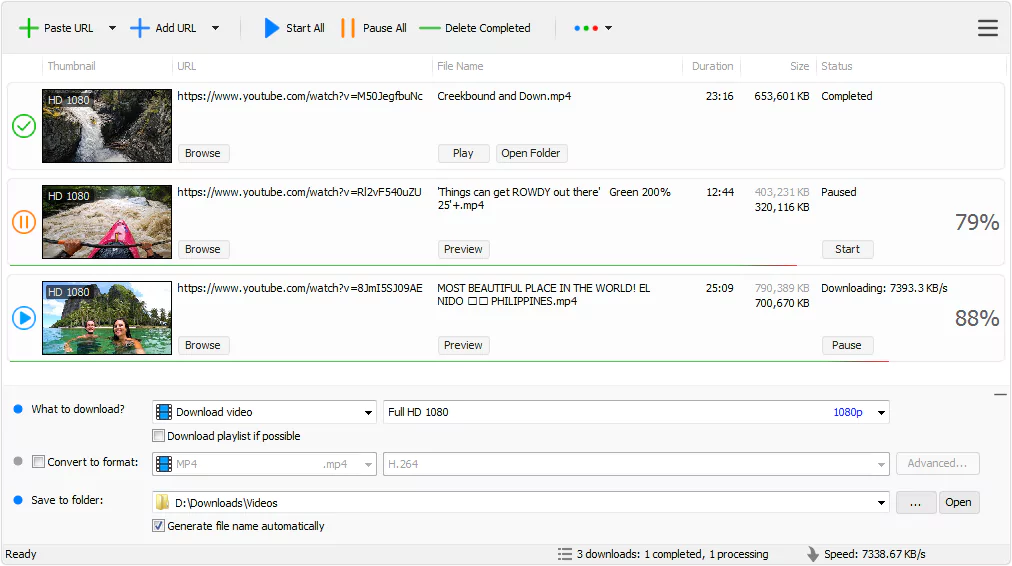

Tomabo MP4 Downloader Pro is a Windows software designed to simplify the process of downloading videos from various online platforms and converting them to MP4 format. It offers a variety of features designed to make it easy to retrieve and save online videos for offline viewing and other purposes.
OVERVIEW OF TOMABO MP4 DOWNLOADER PRO
Tomabo MP4 Downloader Pro is a versatile software for Windows designed to facilitate the process of downloading videos from various online platforms and converting them to MP4 format. With its user-friendly interface and comprehensive features, this tool offers a convenient solution for users who want to save their favorite videos for offline viewing or playback on other devices.
One of the main features of Tomabo MP4 Downloader Pro is the ability to download videos from YouTube, Facebook, Vimeo and other online platforms. Users can easily add video URLs to the software with just a few clicks, and the tool supports importing multiple links at once. This simplified process increases efficiency and customer convenience.
Tomabo MP4 Downloader Pro not only downloads videos but also offers extensive video conversion features. Users can convert downloaded videos to AVI, FLV, MKV and other popular video formats. Furthermore, the software allows users to extract audio streams from videos and save them in MP3, AAC, FLAC and other formats. Users can prepare videos for specific devices like Nokia, BlackBerry, iPhone etc. to ensure compatibility between different devices.
The software allows users to customize their download and conversion options to suit their needs. Before downloading, users can choose the desired video quality, choose a location to save downloaded files, and automatically add downloaded audio and video clips to iTunes for continuous synchronization with iOS devices.
FEATURES OF TOMABO MP4 DOWNLOADER PRO
HIGH-SPEED DOWNLOAD PERFORMANCE
Tomabo MP4 Downloader is designed to deliver a fast and seamless downloading experience to users who want to save videos from YouTube, Facebook, Dailymotion, Vimeo and hundreds of other streaming platforms. The program uses advanced multi-threading technology to accelerate the download speed by dividing files into segments and downloading them simultaneously. This allows for faster completion without compromising stability and quality. Users can pause and resume downloads at any time, which is convenient for effectively managing large files or unstable internet connections.
WIDE RANGE OF SUPPORTED WEBSITES AND FORMATS
One of the advantages of Tomabo MP4 Downloader is its compatibility with a wide range of video hosting platforms. It supports not only YouTube but also other major and lesser-known sites, giving users the flexibility to collect videos from different sources. The downloader can work with MP4, FLV, WEBM, 3GP, AVI formats, allowing users to choose the file type that best suits their playback or editing needs. Whether you want to save videos for offline viewing, presentations, or creative projects, Tomabo MP4 Downloader ensures excellent compatibility with most devices and media players.
HD, FULL HD, 4K VIDEO QUALITY OPTIONS
Tomabo MP4 Downloader gives users the freedom to choose the video quality that best suits their needs. From standard definition (SD) to high definition (HD), Full HD (1080p), and even 4K Ultra HD, this program ensures maximum clarity and resolution. This flexibility is ideal for those who want to save storage space by downloading smaller files or prefer high-quality visuals for a larger screen. The downloader preserves the original quality of audio and video, and even after conversion, the video will remain clear and vibrant with synchronized audio.
VIDEO CONVERTER FOR MULTIPLE OUTPUTS
The main feature that enhances the usability of Tomabo MP4 Downloader is its integrated video converter. After downloading, users can directly convert their videos to different formats such as MP4, MOV, WMV, MPG, FLV, or MP3. It eliminates the need for third-party conversion tools and saves time in preparing files for various devices such as smartphones, tablets, TVs, and game consoles. The converter also supports user settings, allowing users to change parameters such as resolution, bitrate, and frame rate to achieve optimal results.
BATCH DOWNLOAD AND PLAYLIST SUPPORT
For users who frequently download many videos, Tomabo MP4 Downloader offers convenient support for batch download and playlists. You can add multiple video links to the download queue or paste the URL of a YouTube playlist, and the software will automatically download and process all the videos in order. This automation saves time and effort, especially when downloading entire music albums, educational lectures, and series. The software can automatically rename files based on video titles or metadata, ensuring an organized download library.
SIMPLE INTERFACE AND REGULAR UPDATES
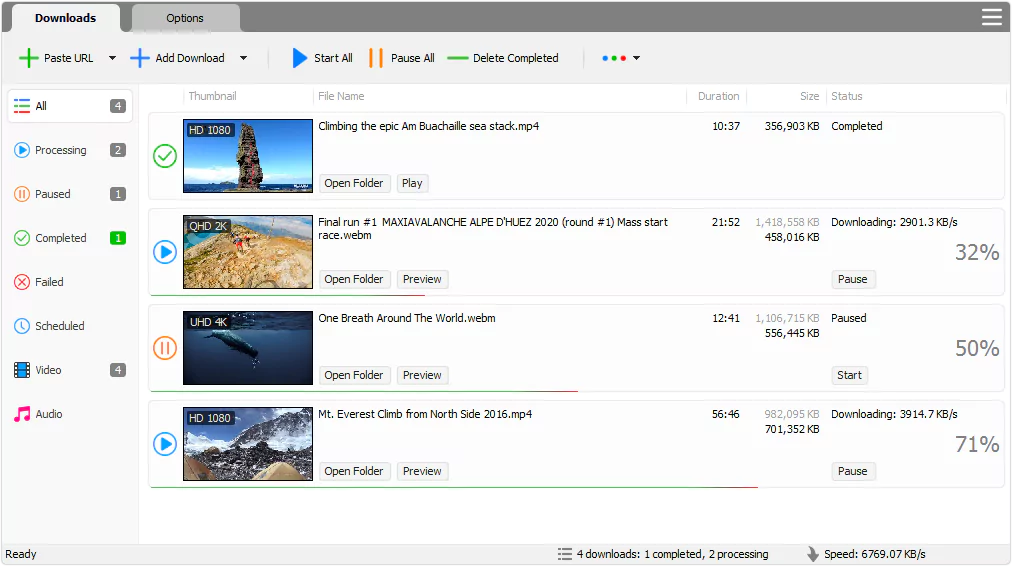
Tomabo MP4 Downloader is known for its clean and easy-to-use interface, designed to be intuitive even for beginners. The drag-and-drop feature and one-click download system allow you to quickly grab videos without any technical issues. The software displays a clear progress indicator and download statistics for user convenience. In addition, it keeps up with changes from major streaming sites and receives regular updates from the developers to improve speed, stability, and security. This continuous improvement ensures that users can always rely on it for consistent performance.
SYSTEM REQUIREMENTS
- Supported OS: Windows 11/10/8.1/7
- Memory (RAM): 1 GB of RAM or more is required
- Hard Disk Space: 100 MB or more required