JRiver Media Center is a powerful multimedia center that combines work with music, video, and photos. Plays most popular audio and video formats including MP3, Audio CD (supports CDDB), and DVD, can convert audio tracks from CD to WAV and MP3, copies vinyl records and cassettes to hard disk (removing interference and noise), and also creates audio CDs, and for all these functions the program has many customizable options.
OVERVIEW OF JRIVER MEDIA CENTER
JRiver Media Center is a complete multimedia software solution designed to meet the diverse needs of media enthusiasts. JRiver is an all-in-one platform that integrates audio, video, and image functions to create a versatile and user-friendly experience for users.
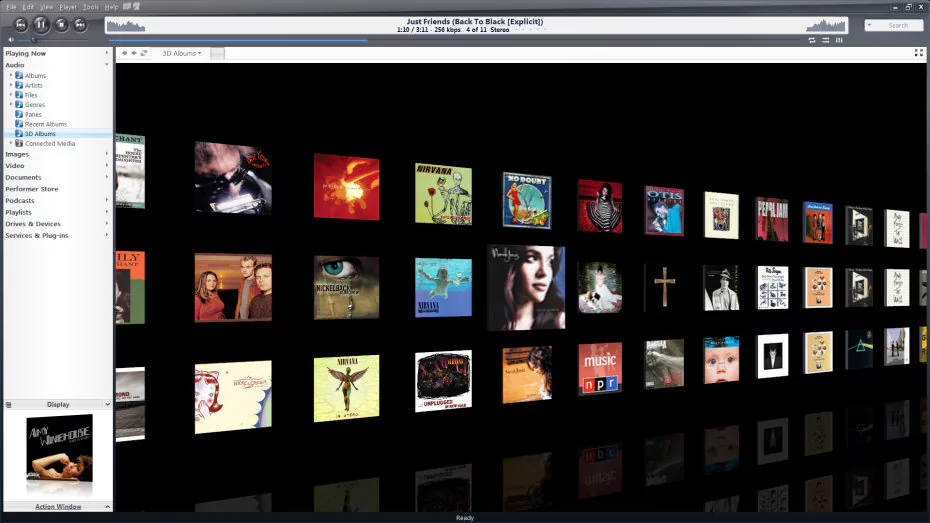
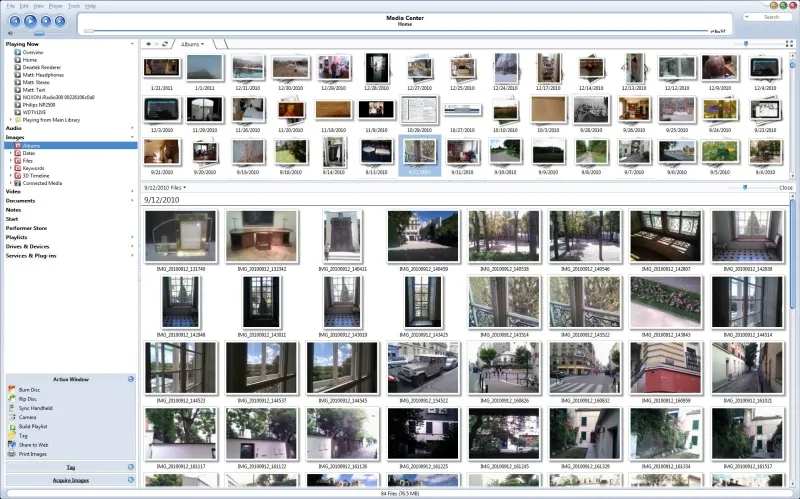
Basically, JRiver Media Center excels at managing and organizing your digital media library. With support for a wide range of file formats, users can easily import, sort, and view their huge music, movie, and photo collections. The software’s intuitive interface allows users to easily navigate through libraries using features such as customizable views, sorting options, and powerful search capabilities.
One of JRiver’s standout features is its powerful audio playback capabilities. Audiophiles will appreciate the support for high-resolution audio formats, advanced DSP (Digital Signal Processing) options, and adjustable 31-band equalizer. The software offers support for a variety of playback devices, including networked audio devices, and compatibility with popular audio standards.
When it comes to video playback, JRiver Media Center provides a smooth and immersive experience. It supports a large number of video formats, making it a versatile player for both local and streaming content. The software is capable of previewing video thumbnails, supporting subtitles, and efficiently organizing and sorting video libraries.
In addition to playback, JRiver Media Center acts as a multimedia center and offers features such as media server capabilities. Users can stream media to other devices on their network, turning their PC into a central media center that can be accessed from multiple locations. There’s also a remote control, so users can control media playback from a smartphone or tablet.
FEATURES OF JRIVER MEDIA CENTER
COMPREHENSIVE MEDIA MANAGEMENT
JRiver Media Center is a powerful all-in-one media management solution designed to organize, play, and stream a wide variety of digital media. It supports audio, video, photo, and TV content, allowing users to centralize all their media files in a single, easy-to-manage library. Advanced tagging, sorting, and rating features make it easy to quickly sort and find content.
HIGH-QUALITY AUDIO PLAYBACK
This software is known for its audio playback capabilities. It supports a wide range of formats, including MP3, FLAC, WAV, AAC, and DSD, providing high-quality sound for audiophiles. JRiver Media Center offers advanced DSP (digital signal processing) options such as equalizer, crossfade, and upsampling, allowing users to fine-tune audio performance.
VIDEO PLAYBACK AND EDITING TOOLS
JRiver Media Center excels in its video playback capabilities, supporting formats such as AVI, MP4, and MKV. Users can adjust color, brightness, and contrast, and apply video filters to enhance image quality. The software provides smooth playback of high-definition and 4K content, as well as basic video editing functions such as cropping and file conversion, making it a versatile tool for multimedia enthusiasts.
STREAMING AND REMOTE ACCESS
The software provides powerful streaming capabilities that allow users to play media on multiple devices on their home network or remotely over the Internet. It supports DLNA, UPnP, and other streaming protocols, and seamlessly integrates with smart TVs, mobile devices, and audio systems. This flexibility allows users to enjoy their media whenever and wherever they want.
EXTENSIVE CUSTOMIZATION AND PLUGINS
JRiver Media Center offers a wide range of customization options by changing the skin, layout, and interface, allowing users to customize the software to their liking. It supports plugins that extend functionality, such as additional codecs, rendering, and streaming services. This adaptability allows the software to meet the diverse needs of users and evolve with changing media technologies.
RECORDING, CD RIPPING, AND LIBRARY BACKUP
In addition to playback, JRiver Media Center offers tools for direct audio and video recording, as well as CD ripping for digital storage. Users can create playlists, convert files between formats, and back up entire libraries to prevent data loss. These features provide a comprehensive solution for efficiently and securely managing, storing, and using digital media.
SYSTEM REQUIREMENTS
- Supported OS: Windows 11/10/8.1/7
- Memory (RAM): 1 GB of RAM or more is required
- Hard Disk Space: 200 MB or more required