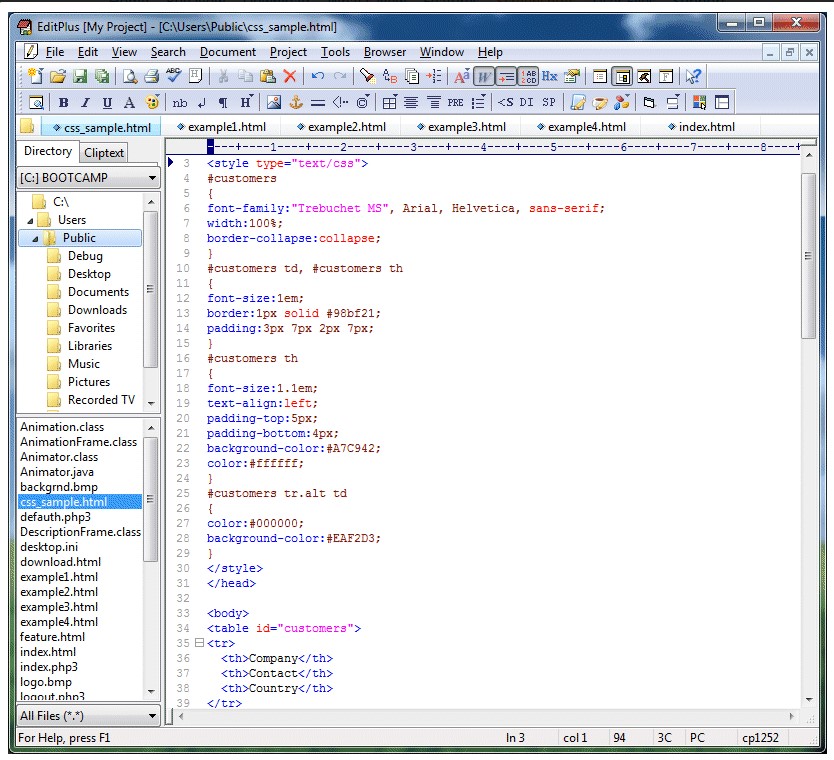

ES-Computing EditPlus is a versatile text editor for Windows that supports syntax highlighting, code folding, and FTP/SFTP for web development. It handles various programming languages, including HTML, CSS, JavaScript, Java, C++, and more. Lightweight and efficient, EditPlus offers features such as auto-completion and customization tools, as well as seamless browser integration, making it a useful tool for developers and coders.
OVERVIEW OF ES-COMPUTING EDITPLUS
ES-Computing EditPlus is a versatile text, HTML, and code editor designed for programmers, web developers, and advanced text editor users. This lightweight yet powerful software from ES-Computing is a great alternative to traditional text editors like Notepad, offering a wide range of features to improve productivity and code management.
EditPlus supports HTML, CSS, PHP, Java, C++, JavaScript, Python, and many other programming languages, with easy-to-read syntax highlighting. The software provides a seamless environment for writing and editing source code, web pages, and configuration files. Its intuitive interface makes it suitable for both beginners and experienced developers who need a fast and responsive editing tool.
Other powerful features include auto-completion, code folding, embedded text windows, column selection, and powerful search and replace tools designed to improve coding efficiency. EditPlus supports custom syntax files, which allows users to define syntax highlighting for additional programming languages. Hex Viewer, word wrapping, and spell checker add more flexibility to various editing needs.
ES-Computing EditPlus is a reliable and feature-rich text editor that combines the simplicity of a lightweight notebook with the advanced features of a professional IDE. It is the perfect choice for developers and power users who seek speed, efficiency, and accuracy in their daily coding and text editing tasks.
FEATURES OF ES-COMPUTING EDITPLUS
POWERFUL TEXT AND CODE EDITING ENVIRONMENT
ES-Computing EditPlus provides a robust and flexible environment for editing plain text, web code, and programming scripts. It is more than just a simple text editor; it is a complete development companion for programmers, web developers, and writers. The software supports a wide range of programming languages, including HTML, CSS, JavaScript, PHP, Java, C/C++, Python, Ruby, and Perl. Its advanced syntax highlighting feature automatically color-codes text elements to improve readability and reduce coding errors. In addition, EditPlus offers unlimited undo and redo functions, smooth scrolling, and automatic line breaks, allowing users to efficiently maintain clean and structured code.
ADVANCED SYNTAX HIGHLIGHTING AND CUSTOMIZATION
One of the most powerful features of EditPlus is its customizable syntax highlighting system. Users can edit and create syntax-highlighted files in any programming language, extending the editor’s capabilities beyond the built-in support. Color schemes and highlighting styles can be customized to suit user preferences, improving visibility and helping to stay focused during long coding sessions. Code folding and bracket matching make it easier to manage and manipulate complex scripts, while block indentation and commenting tools further simplify the coding process. This flexibility allows developers to work comfortably in the language or framework of their choice.
INTEGRATED WEB BROWSER AND HTML TOOLS
EditPlus is ideal for web developers thanks to its tools for web browsers and HTML. The internal browser allows users to view web pages directly in the editor, allowing them to quickly check code changes without switching to an external browser. It also supports real-time preview of dynamic HTML, JavaScript, and CSS. Additional HTML-related tools include auto-completion of commonly used tags, a color picker, a table builder, and a powerful HTML toolbar for quickly inserting elements. These integrated features significantly speed up the web design process and help developers produce cleaner, standards-compliant code.
SEAMLESS FTP, FTPS, AND SFTP INTEGRATION
Another key advantage of EditPlus is its FTP, FTPS, and SFTP features that allow users to upload, download, and manage files directly to remote servers. This integration eliminates the need for separate FTP software and simplifies website maintenance or project deployment. Developers can open, edit, and update files on the web server as if they were stored locally, saving valuable time during updates or debugging. The connection manager securely stores login credentials and server settings, allowing you to quickly connect to frequently used web hosts.
PRODUCTIVITY AND AUTOMATION FEATURES
EditPlus includes a variety of productivity tools designed to simplify and speed up repetitive coding tasks. Autocomplete helps you type frequently used keywords, tags, and functions. The powerful find and replace tool supports regular expressions, batch replacement, and multi-file search. You can write and replay macros to automate repetitive tasks and reduce manual effort. Column selection, memory history, and customizable keyboard shortcuts further improve efficiency. Users can save reusable sections, improve workflow, and ensure project stability.
USER-FRIENDLY INTERFACE AND EXTENSIVE FILE SUPPORT
EditPlus’s interface is clean, intuitive, and highly customizable, making it suitable for both beginners and experienced professionals. Its tabbed document interface allows you to open multiple files at once, while the document selector neatly displays all active sessions. The software supports a wide range of file formats, including text, HTML, XML, PHP, JSP, and configuration files. Features like spell checking, word processing, and encoding conversion make it versatile enough for coding and general text editing. With its lightweight design, fast startup times, and broad compatibility with modern Windows systems, EditPlus remains one of the most reliable and efficient code editors for developers who demand performance, flexibility, and simplicity in one package.
SYSTEM REQUIREMENTS
- Supported OS: Windows 11/10/8.1/7
- Memory (RAM): 1 GB of RAM or more is required
- Hard Disk Space: 100 MB or more required