
EarthView is an interesting and informative screensaver and wallpaper utility designed to turn your computer screen into a dynamic window, giving you a real-time view of the Earth’s day and night cycles. At its core, EarthView organizes a stunning visual experience by displaying high-quality images that rotate the Earth to show the distribution of sunlight and darkness around the world. It not only adds an aesthetic appeal to the computer screen, but also allows the user to visualize the dynamic nature of our planet in an amazing and fascinating way.
OVERVIEW OF EARTHVIEW
One of EarthView’s unique features is its ability to adapt to high resolutions, allowing users with a variety of display options to view crisp, detailed images. The software’s ability to produce high-resolution images enhances the overall viewing experience and makes it a good choice for those with advanced display settings.
In addition to visuals, EarthView is an educational tool that provides information about the world’s most densely populated cities. This feature adds a layer of information to the screensaver, allowing users to explore the geographic distribution of population density. As the world turns gracefully, users can explore the global landscape of urban centers, creating a nexus of visual engagement and educational enrichment.
EarthView’s versatility extends to double functionality as a screensaver and wallpaper. Users can choose dynamic rotation of the world as a screensaver with an animated, constantly changing background image when the computer is idle. Alternatively, the application allows users to set a world map as wallpaper, which turns the desktop into a visual and informational landscape.
FEATURES OF EARTHVIEW
DYNAMIC WALLPAPERS AND SCREENSAVERS
One of the most impressive features of EarthView is its ability to transform your desktop background and screen saver into a living image of the Earth. Unlike static wallpapers, EarthView displays a high-resolution, real-time representation of the globe. Users can see detailed images of the Earth, including city lights, clouds, and various landscapes that change day and night. This not only visually enhances their computer desktop, but also provides them with a constant reminder of the beauty and complexity of the Earth and an informative experience. The wallpaper and screen saver options allow for a wide range of flexibility and customization.
HIGH-RESOLUTION DISPLAY OPTIONS
EarthView supports stunning high-resolution images, ensuring sharp, detailed images even on large screens or multi-screen setups. With support for resolutions up to 3840×2160 pixels (4K), users can view the Earth in crystal clear detail without pixelation or loss of quality. This feature is especially useful for those using high-end monitors, ultra-wide screens, or projection systems. The high resolution makes landscapes, city lights, and cloud formations appear sharp and realistic, creating a stunning visual experience.
DAY AND NIGHT VIEWS
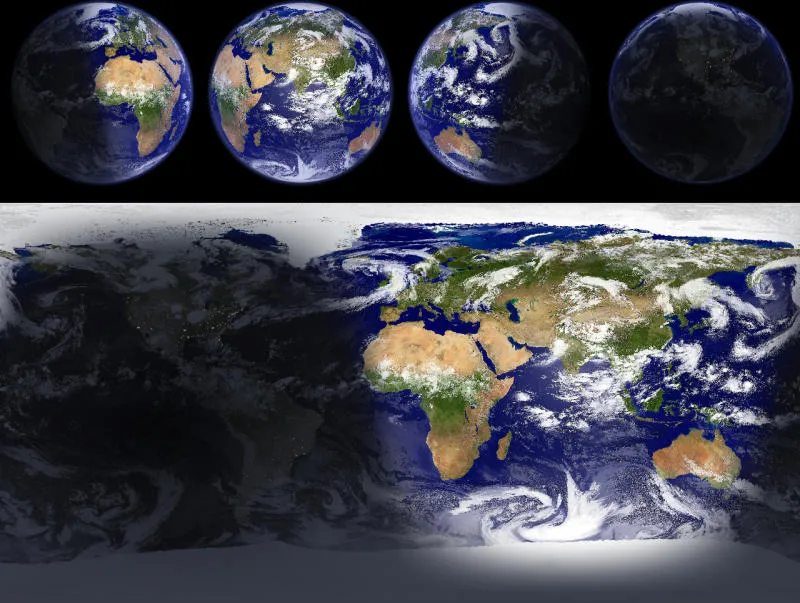
Another highlight is that EarthView realistically displays day and night conditions around the world. The program uses real-time calculations to determine which parts of the planet are illuminated by the sun and which are in darkness. During the day, continents, oceans, and clouds are shown in natural light, while at night, the map changes to show the city lights shining in urban areas. This dual-view system not only improves visibility, but also gives users a dynamic understanding of time zones, sunlight distribution, and global geography.
ACCURATE ASTRONOMICAL CALCULATIONS
EarthView integrates advanced astronomical algorithms to provide accurate displays. The software calculates the exact positions of the sun, moon, and Earth, and accurately depicts shadows, twilight zones, and illumination. As a result, users see a world view that is not only artistic but also scientifically accurate. Whether it’s the Earth’s seasonal tilt or the movement of the sun’s hemisphere, EarthView reflects these changes in real time. This makes the software appealing to both casual users and those interested in geography, astronomy, and environmental science.
REAL-TIME CLOUD DATA INTEGRATION
One of the most interesting aspects of EarthView is its ability to integrate real-time weather and cloud data. With an Internet connection, the program can download the latest satellite cloud maps and overlay them on the Earth’s screen. This allows users to see real-time global weather conditions, including storm formations, cloud cover, and atmospheric patterns. This feature adds depth and realism, making EarthView not only a decorative tool but also a small observation platform for monitoring global weather activity.
MULTIPLE MAP VIEWS AND PERSPECTIVES
EarthView supports a variety of map views and viewing modes, giving you flexibility in how you view the world. Users can choose between a globe view, which shows the Earth as a 3D sphere, or a map view, which shows the planet from a more traditional cartographic perspective, which shows it flat. This versatility allows people to customize their viewing experience based on personal preference, educational use, or aesthetic appeal. Different perspectives help them understand the geographical relationships between continents and countries in unique ways.
CALENDAR AND TIME ZONE INTEGRATION
The software comes with a calendar and time zone system that adds more than just aesthetics. EarthView can highlight local time, sunrise and sunset times, moon phases, and even seasonal changes around the world. This integration is especially useful for those working with international teams, travelers, and students studying world geography. By combining visualization with time-related data, EarthView becomes a practical reference tool for understanding how different parts of the world operate in different time frames.
CUSTOMIZATION AND CUSTOMIZATION OPTIONS
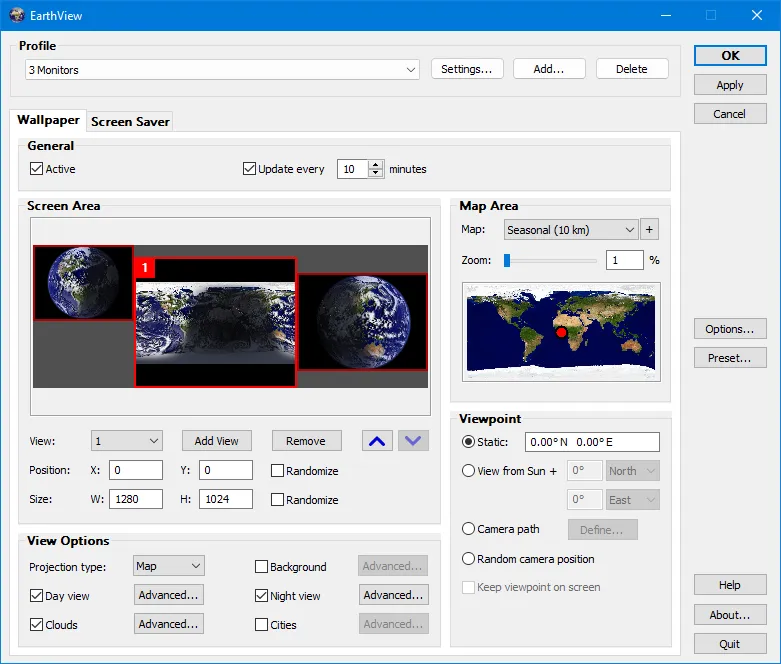
EarthView allows users to customize the software to their liking. Options include adjusting the level of detail, changing the color scheme, choosing which elements (clouds, city lights, borders) to display, and changing the refresh rate. Users can fine-tune EarthView to balance performance and visual quality based on their hardware capabilities. This customization allows the program to run smoothly on a wide range of systems and offers a personalized experience. Whether you prefer a simplified minimalist view or a full-resolution, data-rich display, EarthView can meet your needs.
SYSTEM REQUIREMENTS
- Supported OS: Windows 11/10/8.1/7
- Memory (RAM): 1 GB of RAM or more is required
- Hard Disk Space: 100 MB or more required