
DBF Viewer 2000 is a program for viewing and editing database files in dBASE format. The dBASE format is a widely used database file format that stores data as a table and is widely used in various database applications. DBF Viewer 2000 is a versatile software for viewing and editing database files in the popular dBASE format. As a widely used database file format, dBASE stores data as tables with a spreadsheet-like structure. This program is specifically designed to facilitate user interaction with these DBF files, allowing seamless navigation of the data within.
OVERVIEW OF DBF VIEWER
DBF Viewer 2000 is a powerful and user-friendly software for comprehensive viewing and editing of database files in the popular dBASE format. The dBASE format, a widely used database file format, organizes data in a table-like format suitable for a variety of database applications. DBF Viewer 2000 is equipped with a variety of features that facilitate efficient data management and coordination.
The main function of the program is to provide users with an easy interface to navigate DBF files. Users can easily view logs, edit data, and manage file contents in an easy-to-use environment. The simplicity and versatility of the dBASE format make it preferred by many database applications, and DBF Viewer 2000 meets the specific needs of users dealing with these file types.
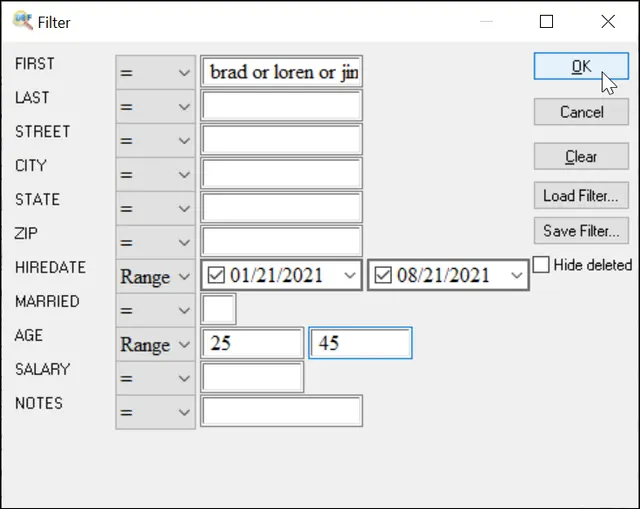
One of the main advantages of DBF Viewer 2000 lies in its ability to improve data analysis. Users can use this program to filter and sort data so that they can focus on specific subsets of data. The inclusion of search and query functionality simplifies data retrieval and makes it easier for users to identify and extract relevant data from DBF files.
In addition to viewing and editing, DBF Viewer 2000 supports advanced functions such as data export and import. Users can import and export data to various formats such as CSV, Excel, SQL, etc., and are compatible and interoperable with other applications. This feature is especially useful for users who need to integrate data in dBASE format across different environments.
FEATURES OF DBF VIEWER
QUICKLY VIEW DBF FILES
DBF Viewer allows users to directly open and read files in DBF (Database File) format without using complex database software. Its lightweight interface allows both professionals and beginners to quickly access table data, fields, and records.
EDIT AND UPDATE RECORDS
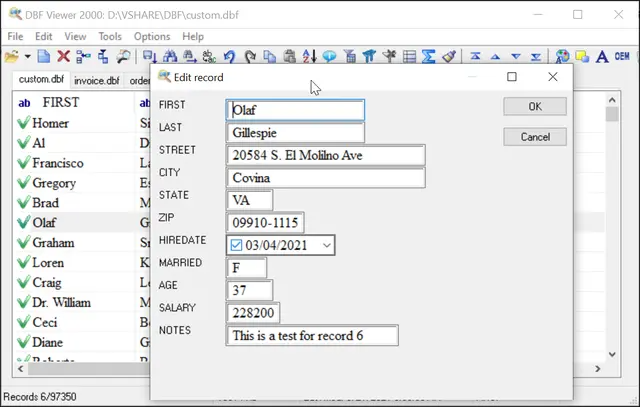
DBF Viewer provides tools for viewing and directly editing records within the file. Users can easily add, modify, and delete entries without using a dedicated database management system to keep the database content accurate and up-to-date.
SEARCH AND FILTER CAPABILITIES
The program includes powerful search and filter options to find specific records in large DBF files. Users can apply criteria, sort data, and refine searches, making it effective for managing and analyzing large databases.
TABLE STRUCTURE MANAGEMENT
DBF Viewer allows users to view and edit the table structure themselves. Fields can be added, renamed, and deleted, and their data types can be configured. This flexibility allows you to change the location of the database directly from the application.
IMPORT AND EXPORT SUPPORT
The software supports importing and exporting DBF data to other common formats such as CSV, TXT or Excel. This feature ensures compatibility with other software and makes it easy to share, analyze and transfer data across platforms.
PRINTING AND REPORTING TOOLS
DBF Viewer includes options to print the database contents or generate simple reports. This helps users to create hard copies of the data or export reports for presentation, analysis and record keeping.
BATCH PROCESSING
For users who work with many DBF files, batch operations can save time. DBF Viewer can process, convert and update multiple files at the same time, which is especially useful for professionals who manage large databases.
USER-FRIENDLY INTERFACE AND COMPATIBILITY
The tool is designed with a clean and simple interface, which makes it easy to use even for non-technical users. It supports a wide range of DBF formats used in legacy systems and modern applications, ensuring backward compatibility.
SYSTEM REQUIREMENTS
- Supported OS: Windows 11/10/8.1/7
- Memory (RAM): 1 GB of RAM or more is required
- Hard Disk Space: 100 MB or more required