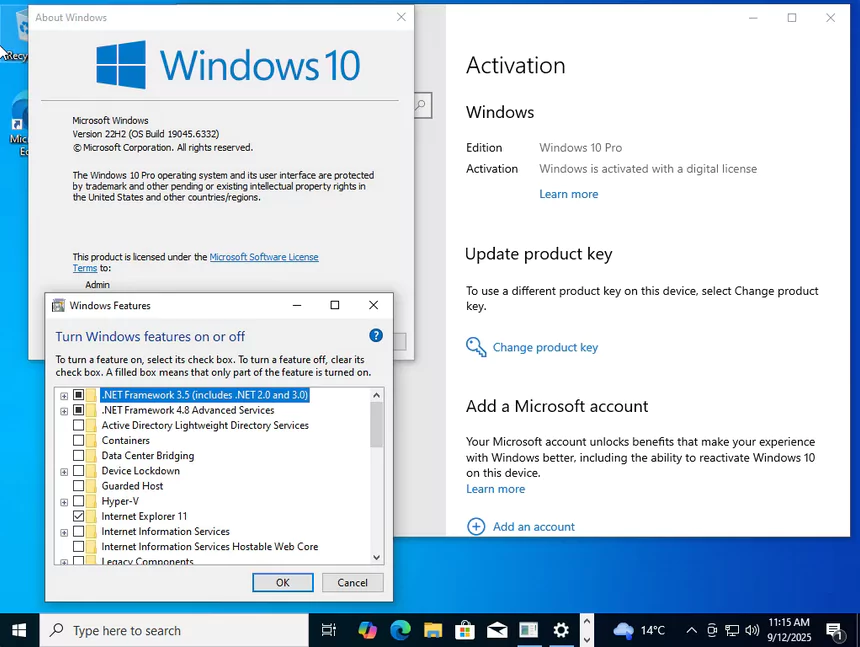
Windows 10 Pro is a powerful version of Microsoft’s Windows 10 operating system, designed to serve professional users and business environments. It includes all the core features of Windows 10 Home, such as the modern user interface, Microsoft Edge browser, Cortana digital assistant, and access to the Microsoft Store, but comes with advanced tools and security improvements. One of its main advantages is BitLocker encryption, which helps protect drives from unauthorized access and protect confidential information.
OVERVIEW OF MICROSOFT WINDOWS 10 PRO
Windows 10 Pro is Microsoft’s professional-level version of the Windows 10 operating system, designed to provide advanced functionality, strong security, and powerful management tools for businesses, professionals, and power users. While it shares the core features of Windows 10 Home, such as the modern interface, Microsoft Edge browser, Cortana integration, and access to the Microsoft Store, Windows 10 Pro goes one step further to meet the needs of productivity and enterprise.
One of its unique features is BitLocker, a full-disk encryption tool that protects confidential information and protects against theft and unauthorized access. In addition, Windows 10 Pro includes Remote Desktop, which allows users to remotely access their computers from anywhere, providing flexibility for remote work and business operations. For IT professionals and organizations, it offers Group Policy Management, which allows you to optimize and manage multiple computers on a network. It also supports domain join and Azure Active Directory, so it can easily integrate into corporate infrastructure.
FEATURES OF MICROSOFT WINDOWS 10 PRO
BITLOCKER ENCRYPTION
BitLocker is one of the most valuable security features in Windows 10 Pro, designed to protect sensitive information from unauthorized access. It provides full disk encryption, which means that the data on your hard drive or solid-state drive is protected even if the device is lost or stolen. This is especially useful for business professionals and organizations that work with sensitive files or financial information. BitLocker offers complete flexibility for protecting portable data, allowing you to encrypt portable drives with BitLocker To Go. Unlike third-party encryption tools, BitLocker is integrated directly into the operating system, making it easy, efficient, and simple to manage through Control Panel or Group Policy. This feature demonstrates Microsoft’s commitment to providing enterprise-grade security for everyday users and businesses.
REMOTE DESKTOP ACCESS
Windows 10 Pro includes Remote Desktop, which allows users to access their PC from anywhere. This is especially useful for professionals who need to manage their work and files while away from the office. Remote Desktop lets you securely connect to your computer from another device, allowing you to run programs, manage files, and troubleshoot problems without being physically present. Businesses often rely on this feature to help IT teams provide remote support to employees or securely access centralized systems. Unlike the Remote Desktop feature in Windows 10 Home, Remote Desktop in Windows 10 Pro offers full remote control and flexibility, making it a practical tool for mobile workers, freelancers, and businesses operating in hybrid or remote work environments.
HYPER-V VIRTUALIZATION
Hyper-V is Microsoft’s built-in virtualization platform available in Windows 10 Pro that allows users to create and manage virtual machines directly on their computers. This feature is very useful for developers, IT professionals, and testers who need to run multiple operating systems in an isolated environment or test software. For example, you can run different versions of Linux or Windows on the same hardware without affecting the main operating system. Hyper-V is an alternative to third-party virtualization software such as VMware or VirtualBox, offering native integration and consistent performance. It supports snapshots, resource allocation, and hardware-level virtualization, making it a professional-grade tool for testing, training, or enterprise-level deployments. Hyper-V is a must-have feature for anyone working in software development, cybersecurity, or IT infrastructure.
GROUP POLICY MANAGEMENT
Group Policy Management in Windows 10 Pro is a feature designed to give administrators centralized control over multiple systems on a network. It allows you to fine-tune system settings, user permissions, and security protocols. For example, IT administrators can restrict access to specific applications, enforce password complexity, configure update settings, or disable certain features to comply with organizational policies. This is essential for businesses and organizations that need to ensure consistency and security across multiple devices. Unlike Windows 10 Home, which only allows for basic configuration, Windows 10 Pro provides IT teams with advanced tools for policy enforcement and compliance. Group Policy Management not only improves security, but also increases productivity by ensuring that all systems follow standardized settings, reducing troubleshooting and configuration time.
DOMAIN JOIN AND AZURE ACTIVE DIRECTORY
Windows 10 Pro supports domain join and Azure Active Directory, which are essential for businesses managing multiple users and devices. Joining a domain allows computers to connect to a company’s centralized IT infrastructure, making it easier to enforce policies, share resources, and manage security. Azure Active Directory integration moves this to the cloud, giving businesses single sign-on (SSO) access to apps and services like Microsoft 365, Salesforce, and other enterprise apps. It helps employees stay secure while also allowing them to sign in with a single account across multiple platforms. This feature is especially important for organizations moving to a hybrid or cloud environment. It connects traditional IT setups with modern cloud-based services, giving Windows 10 Pro a significant advantage in business environments.
WINDOWS UPDATE FOR BUSINESS
Windows 10 Pro includes Windows Update for Business, which lets administrators manage and control how updates are delivered to devices. Unlike Windows 10 Home, where updates are automatic and inflexible, Pro users can delay feature updates for months and schedule updates during off-hours to avoid unexpected delays. This feature helps keep systems secure while minimizing downtime and compatibility issues. For enterprises, this control is essential to avoid conflicts between new updates and critical software. It helps IT teams test selected system updates before rolling them out to the entire organization. With this level of control, businesses can keep their systems up-to-date without compromising productivity and balance security and stability.
SYSTEM REQUIREMENTS
- Processor: 1 gigahertz (GHz) or faster processor or SoC
- RAM: 1 gigabyte (GB) for 32-bit or 2 GB for 64-bit
- Hard disk space: 16 GB for 32-bit OS or 20 GB for 64-bit OS
- Graphics card: DirectX 9 or later with WDDM 1.0 driver
- Display: 800 x 600 or more