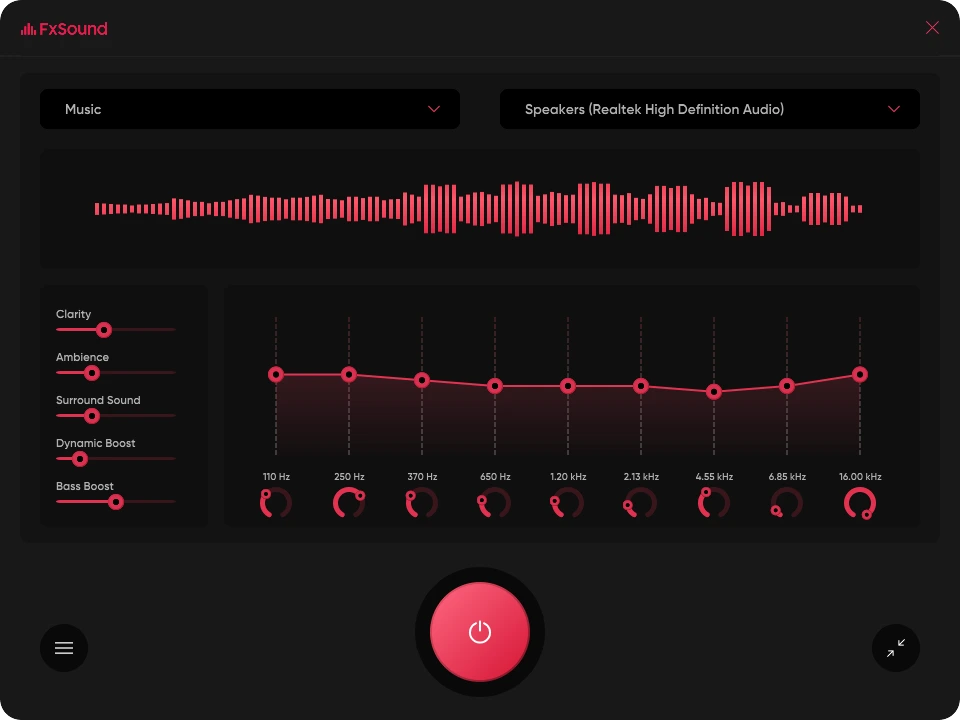

FxSound is an audio enhancement software for Windows that improves sound quality through real-time processing. It enhances music, movies, games, and voice calls with features such as bass boost, clarity enhancement, ambient noise reduction, and volume level normalization. Designed for both headphones and speakers, FxSound offers customizable presets and an easy-to-use interface, delivering richer, clearer audio without the need for expensive hardware upgrades.
OVERVIEW OF FXSOUND
FxSound is a lightweight audio enhancement software that transforms the listening experience on your Windows computer. It uses advanced digital signal processing (DSP) technology to enhance sound quality by improving bass, clarity, dynamics, and stereo imaging. Whether you’re listening to music, watching movies, playing games, or participating in online meetings, FxSound delivers clearer, fuller, and deeper audio.
The software includes multiple presets optimized for various scenarios such as music, games, movies, voice, and podcasts. Users can further customize the sound using the built-in equalizer controls and audio enhancement sliders to suit their personal preferences or audio devices.
FxSound works with almost any audio output device, including headphones, speakers, Bluetooth devices, and USB audio interfaces. It processes audio in real time across the system, allowing each application to benefit from the enhanced sound quality without requiring additional configuration.
Its intuitive interface is suitable for beginners, while advanced configuration options provide flexibility for audio enthusiasts. The software is optimized for low CPU usage and runs efficiently in the background without a noticeable impact on system performance. Overall, FxSound is a great solution for users who want to improve the audio quality of their computer with customizable enhancements, immersive sound effects, and an easy-to-use interface.
FEATURES OF FXSOUND
HIGH-QUALITY AUDIO ENHANCEMENT
FxSound uses advanced digital signal processing to enhance the sound quality of your computer. It improves audio clarity and restores lost information in compressed files, creating a richer listening experience for music, movies, games, and voice communications.
POWERFUL EQUALIZER AND SOUND TUNING
The software includes a fully customizable equalizer that allows users to fine-tune the frequency range according to their preferences. Additional enhancement controls for bass, dynamic boost, surround, accuracy, and clarity provide fine-tuning of the sound for different listening environments.
OPTIMAL SETTINGS FOR EACH ACTIVITY
FxSound offers a variety of professionally designed settings for music, games, movies, podcasts, TV shows, and voice calls. Users can quickly switch between profiles or create and save their own customized settings for specific audio devices or content types.
REAL-TIME SYSTEM-WIDE AUDIO PROCESSING
Unlike dedicated software audio tools, FxSound enhances all audio played through Windows. All compatible applications – streaming services, web browsers, media players, communication applications, games – automatically take advantage of the improved sound.
WIDE RANGE OF DEVICE COMPATIBILITY
FxSound works seamlessly with laptop speakers, desktop speakers, wired headphones, Bluetooth headsets, USB DACs and external sound cards. It integrates seamlessly with Windows audio devices without requiring additional hardware.
LIGHTWEIGHT PERFORMANCE AND EASY INTERFACE
FxSound is designed to provide continuous real-time audio enhancement while using minimal system resources. Its clean, modern interface allows users to quickly adjust settings, instantly enable or disable effects, and easily manage presets, making it suitable for both casual users and audio enthusiasts.
SYSTEM REQUIREMENTS
- Supported OS: Windows 11/10/8.1/7
- Memory (RAM): 1 GB of RAM or more is required
- Hard Disk Space: 100 MB or more required