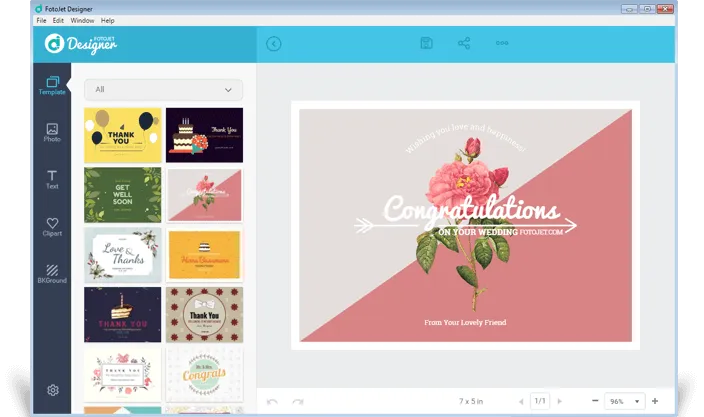

FotoJet Designer is a professional-grade graphic design tool designed to help you create custom designs quickly and easily. It has a repertoire of more than 900 templates and extensive resources, providing users with powerful editing tools suitable for a variety of designs such as cards, invitations, posters, flyers, banners, and more.
OVERVIEW OF FOTOJET DESIGNER
FotoJet Designer is a versatile and user-friendly graphic design tool developed by PearlMountain Limited that allows people to create custom designs quickly and easily. This professional-grade software is equipped with rich features to meet a wide range of design needs. With over 900 templates and thousands of resources, FotoJet Designer offers a wide range of options for creating eye-catching designs for cards, invitations, posters, advertisements, and promotions.
One of the main advantages of FotoJet Designer is its intuitive interface and powerful editing tools. The software’s drag-and-drop feature makes the design process seamless and allows users to easily experiment with different elements. Whether you’re a beginner or an experienced designer, FotoJet Designer’s accessible design process allows you to realize your creative vision without the need for a steep learning curve.
The software’s template library covers a wide range of design types and allows users to choose from a variety of options. This flexibility is ideal for a variety of applications, from social media graphics to promotional materials. FotoJet Designer’s commitment to providing comprehensive resources enhances photo editing capabilities, allowing users to enhance their photos and create stunning photo collages.
What sets FotoJet Designer apart from others is its commitment to style and elegance. The software combines ease of use with professional-grade features, making it a valuable tool for a variety of design projects. Whether you’re designing for personal use, social media, or business advertising, FotoJet Designer’s versatile toolkit gives you access to the resources and tools you need.
FEATURES OF FOTOJET DESIGNER
INTUITIVE GRAPHIC DESIGN TOOLS
FotoJet Designer provides a user-friendly platform for creating a wide range of graphic designs, from social media posts to flyers, posters, and cards. The drag-and-drop interface allows users to easily add, move, and edit elements without requiring advanced design skills. With templates, images, and clipart available, it’s easy to quickly create professional-looking designs. The intuitive workflow allows both beginners and experienced designers to work efficiently.
EXTENSIVE TEMPLATE LIBRARY
A standout feature of FotoJet Designer is its huge library of templates for a variety of purposes, including marketing materials, social media graphics, and personal projects. Templates can be categorized and customized, allowing users to change text, images, and layouts to suit their needs. This feature saves time, inspires, and helps users achieve polished results without having to start from scratch.
POWERFUL IMAGE EDITING CAPABILITIES
FotoJet Designer goes beyond basic graphic design by offering advanced image editing tools. Users can adjust brightness, contrast, saturation, and other image properties, apply filters, crop images, resize images, and remove backgrounds. Layer-based editing provides greater creative flexibility, allowing designers to seamlessly combine multiple images and effects. These image editing features improve the overall quality of a project.
TEXT AND PRINTING OPTIONS
Text customization is another strong point of FotoJet Designer. The software offers a wide selection of fonts, styles, colors, and effects, allowing users to create visually appealing styles. Text can be rotated, aligned, and adjusted to perfectly fit the design theme. With support for multiple text layers, designers can create complex compositions that effectively emphasize key messages.
EXPORT AND SHARING FEATURES
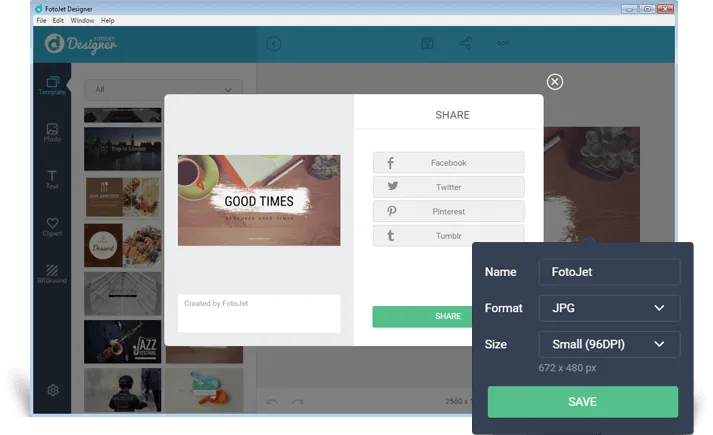
FotoJet Designer makes it easy to share finished projects. Users can export designs to popular formats such as JPEG, PNG, and PDF, with different resolution options suitable for the web or print. Integrated sharing options allow you to publish or print directly to social media platforms. This flexibility allows you to efficiently distribute designs across multiple channels without compromising on quality.
USER-FRIENDLY INTERFACE AND CROSS-PLATFORM SUPPORT
The software is designed with a clean, intuitive interface that minimizes the learning curve and allows you to focus on creativity rather than technical complexity. It also supports multiple platforms and allows you to access it from both desktop and web versions. Regular updates bring new designs, features, and improvements, ensuring that FotoJet Designer remains a reliable and versatile tool for graphic design and photo editing.
SYSTEM REQUIREMENTS
- Supported OS: Windows 11/10/8.1/7
- Memory (RAM): 1 GB of RAM or more is required
- Hard Disk Space: 300 MB or more required