
Topaz Gigapixel AI Pro is an advanced photo enlargement software that uses artificial intelligence to enhance image clarity and detail. Unlike traditional upscaling methods, which interpolate pixels and often produce blurry or pixelated results, Gigapixel AI uses machine learning to analyze millions of image samples and learn how detail is lost when images are enlarged.
OVERVIEW OF TOPAZ GIGAPIXEL AI PRO
Topaz Gigapixel AI is a powerful image enlargement software developed by Topaz Labs, designed to improve the accuracy and precision of digital images with advanced artificial intelligence (AI) techniques. This innovative tool uses deep learning algorithms to maximize images, allowing users to increase size while maintaining high levels of quality and clarity.
The main goal of Gigapixel AI is to solve the common problem of zooming in on images without making them look realistic. Traditional zooming methods can result in pixelation and loss of resolution, especially when working with low-resolution images. Gigapixel AI, on the other hand, uses the power of neural networks to analyze and understand image patterns, allowing it to intelligently fill in details while zooming.
One of the amazing features of Topaz Gigapixel AI is its ability to dramatically improve the quality of images captured by older or lower-resolution cameras. By using massive datasets of high-resolution images in the training phase, the AI model can learn complex details and textures and enhance subtle elements of images captured by less advanced equipment.
FEATURES OF TOPAZ GIGAPIXEL AI PRO
ADVANCED AI-POWERED IMAGE RESIZING
Topaz Gigapixel AI Pro is built on one of the most advanced AI models for image enhancement. Unlike traditional resizing methods, which often produce blurry or pixelated results, this software uses deep learning technology trained on millions of images to predict and add real-world details. The AI not only enlarges images, but also fills in missing pixels with realistic accuracy, making the enhanced image more vivid and natural. This advanced technology allows users to increase the size of images by up to 600% while maintaining clarity and sharpness.
IMPROVED DETAIL AND TEXTURE PRESERVATION
One of the standout features of Topaz Gigapixel AI Pro is its ability to preserve detail and texture when resizing. Photographers, designers, and digital artists often struggle with the problem of losing sharpness when increasing the resolution of images. Gigapixel AI Pro solves this by analyzing every aspect of the image, from edges and patterns to small textures, and preserving the original quality of the output. This software allows you to preserve details in close-up images, such as wildlife fur, architectural structures, and landscape textures.
NOISE REDUCTION AND ARTIFACT REMOVAL
Enlarging an image often increases imperfections such as noise, grain, and compression artifacts. Gigapixel AI Pro incorporates intelligent noise reduction algorithms that reduce these defects and improve subject clarity. It separates out real image details and unwanted artifacts, making the final result cleaner and more attractive. This feature is especially useful for old or poor-quality images, allowing users to restore and enhance images without compromising professional standards.
MULTIPLE PROCESSING MODES FOR VARIOUS NEEDS
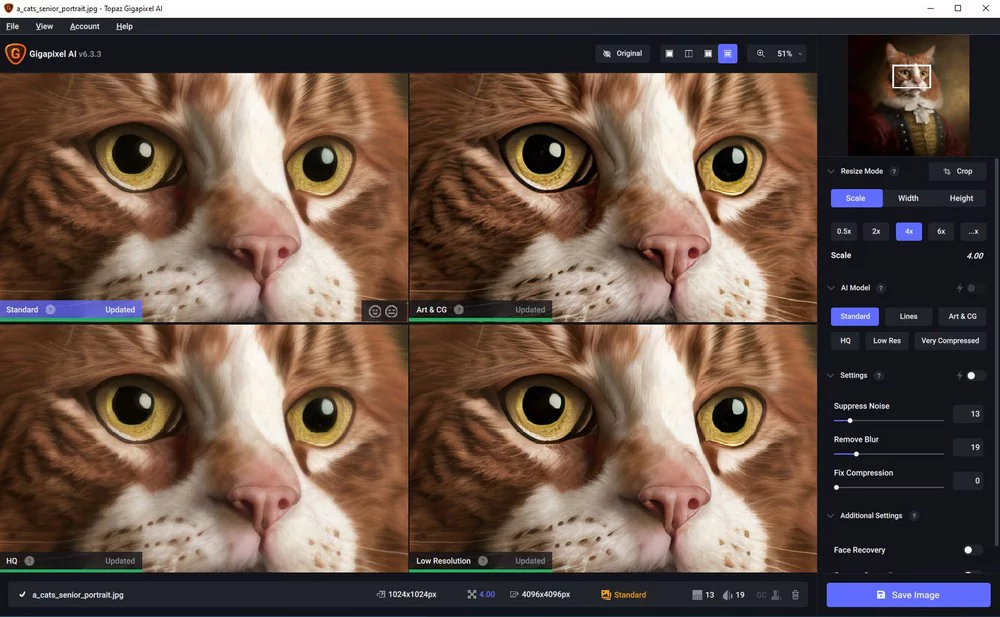
To suit different applications, Topaz Gigapixel AI Pro offers several processing modes, including Standard, Line, Art & CG, Low Resolution, and High Compression. Each mode is optimized for a specific type of image, ensuring the best results. For example, the Line mode is ideal for portraits, cartoons, and architectural drawings, while the Low Resolution mode is ideal for enhancing photos taken with older cameras or smartphones. These flexible options allow users to customize the enhancement process to suit the unique characteristics of their images.
BATCH PROCESSING FOR EFFICIENCY
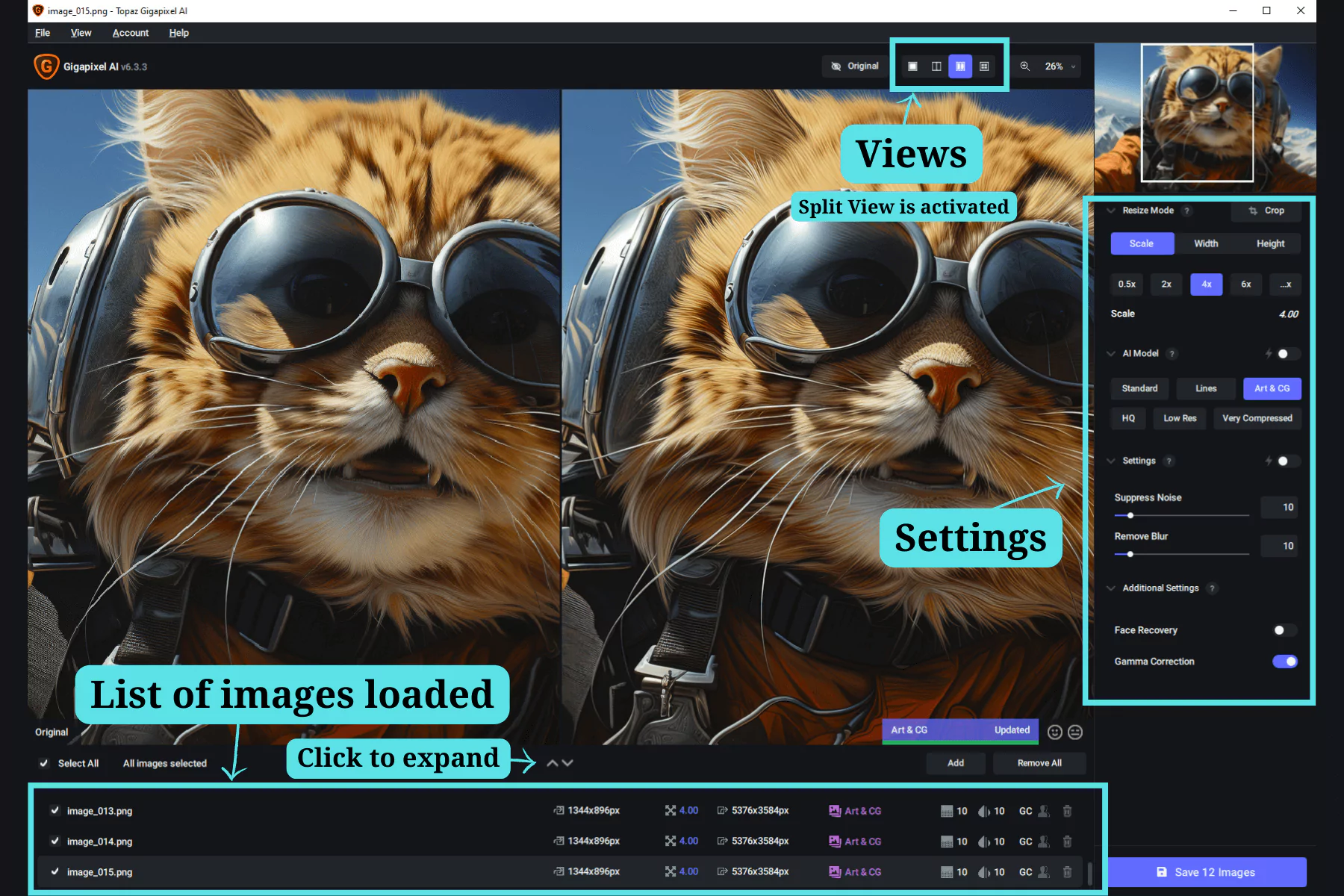
For professionals working with large image collections, Topaz Gigapixel AI Pro offers batch processing. Instead of manually enhancing images one by one, users can process multiple images at once with fixed settings. This not only saves a lot of time, but also ensures consistent quality across all projects. Batch processing is especially useful for photographers, e-commerce businesses, or designers who frequently work with large product or archival image collections.
USER-FRIENDLY INTERFACE AND WORKFLOW INTEGRATION
Gigapixel AI Pro is built with advanced AI technology, yet has a user-friendly interface that streamlines the workflow. Drag-and-drop functionality, real-time previews, and easy-to-use sliders make it easy for beginners to use. Additionally, the software fully integrates into existing workflows by supporting popular file formats such as JPEG, PNG, and TIFF. Professionals can use it alongside other editing tools, making it a versatile addition to any creative toolkit.
SYSTEM REQUIREMENTS
- Operating System: Windows 10, 11 (64-bit)
- Memory (RAM): 8 GB RAM or more is required
- Hard Disk Space: 400 MB or more required
- Processor: Intel i5 or equivalent (AVX instruction set required)