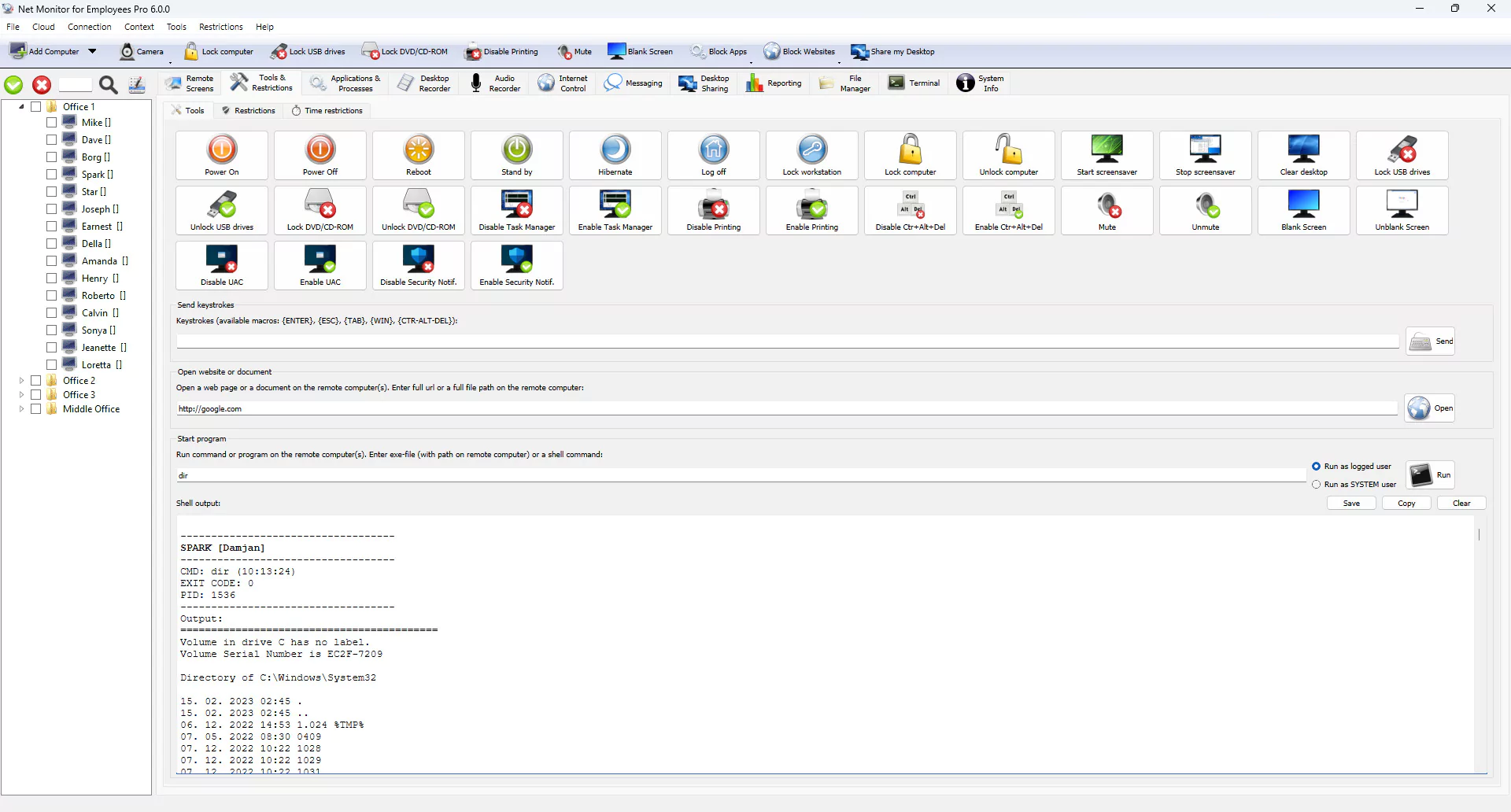
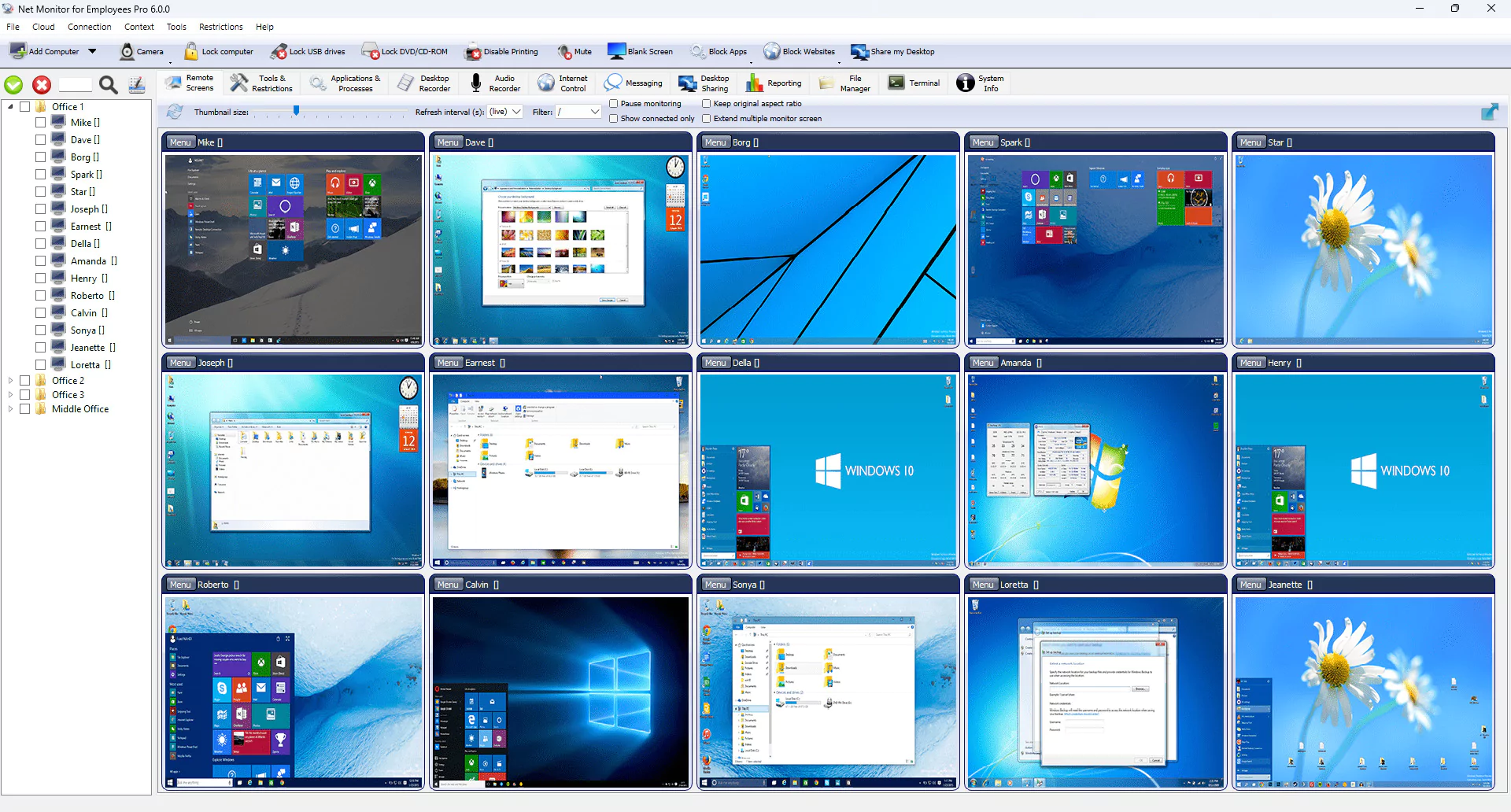
Net Monitor for Employees Pro is a cross-platform monitoring application that allows you to view the activity of multiple remote computers. This software is useful when you need to control and help users perform various tasks using a mouse and keyboard on a remote PC.
OVERVIEW OF NET MONITOR FOR EMPLOYEES PRO
Net Monitor for Employees Pro is a comprehensive monitoring solution for businesses that aims to increase productivity and ensure effective employee management. This software allows administrators to monitor and manage multiple computers in real-time and provides powerful features to support a centralized and efficient work environment.
One of its unique features is real-time screen monitoring, which allows managers to remotely view their employees’ screens and gain instant insight into their performance. This is provided by app controls where employers can see what apps are being used, and Internet activity logs that help detect distractions and inappropriate behavior.
In addition, Net Monitor for Employees Pro supports remote desktop management, allowing supervisors to help employees resolve technical issues without being physically present. This feature is especially useful in remote work scenarios and allows staff to provide instant support.
FEATURES OF NET MONITOR FOR EMPLOYEES PRO
REAL-TIME EMPLOYEE MONITORING
Net Monitor for Employees Pro allows employers and administrators to view employees’ computer screens in real time, making it a powerful productivity monitoring tool. Managers can instantly see what employees are working on and ensure that they are completing the tasks they are expected to. This feature helps to detect unproductive activities, reduce downtime, and increase accountability in the workplace. It allows for simultaneous monitoring of multiple screens, providing a comprehensive overview of team activities.
REMOTE MANAGEMENT AND ADMINISTRATION
In addition to passive monitoring, the software offers remote management capabilities. Administrators can take over an employee’s desktop to provide technical assistance, troubleshoot issues, and guide them through specific processes. This feature does not require a physical presence and is ideal for large organizations with remote work setups or distributed offices. Features such as keyboard and mouse control, file transfer, and application management enhance the versatility of IT support and employee guidance.
ACTIVITY LOGGING AND REPORTING
Net Monitor for Employees Pro securely logs employee activity. Screen recording, keystroke logging, and website/app usage monitoring can be customized to create a detailed record of employee performance. Employers can use these reports to identify productivity trends, identify misuse of company resources, and ensure compliance with workplace policies. Customizable reports and scheduled logs make it easy to track employee behavior over time, supporting both performance reviews and security audits.
COMMUNICATION AND COLLABORATION TOOLS
The software includes integrated communication features that go beyond surveillance. Employers can send direct messages to multiple employees at once, display announcements, and broadcast their screens. This is useful for training, company updates, or group collaboration. Additionally, remote display and file sharing capabilities simplify communication and help reduce dependency on third-party applications. This combination of monitoring and collaboration makes the tool more than just a surveillance program.
INTERNET AND APPLICATION CONTROL
To prevent employee distractions and resource abuse, Net Monitor for Employees Pro allows employers to block websites and applications directly from the control panel. By restricting access to social media, games, or other non-work-related platforms, managers can focus on their employees. This feature helps to improve security by limiting access to unauthorized software or potentially harmful websites, reducing the risk of malware and data breaches in the corporate environment.
USER-FRIENDLY INTERFACE AND SCALABLE FEATURES
Despite its powerful monitoring and control functions, the software is designed with a user-friendly interface and is easy to manage. Administrators can quickly configure monitoring settings, set access restrictions, and generate reports without technical complexity. It is also scalable, making it suitable for small businesses and large enterprises managing hundreds of employees. Net Monitor for Employees Pro stands out as a reliable solution for managing workplace productivity and security with its ease of use, flexibility, and comprehensive monitoring tools.
SYSTEM REQUIREMENTS
- Supported OS: Windows 11/10/8.1/7
- Memory (RAM): 1 GB of RAM or more is required
- Hard Disk Space: 100 MB or more required