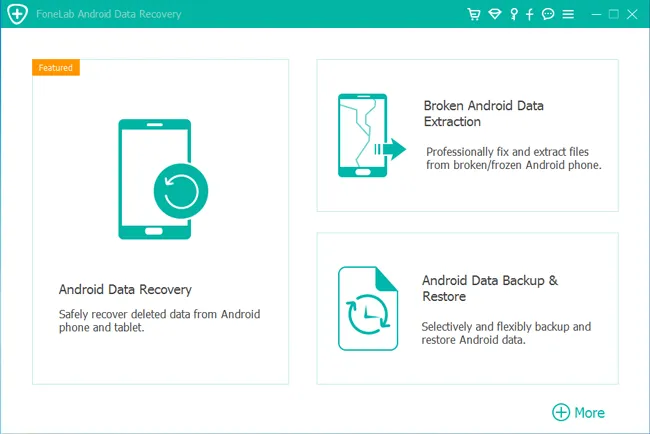
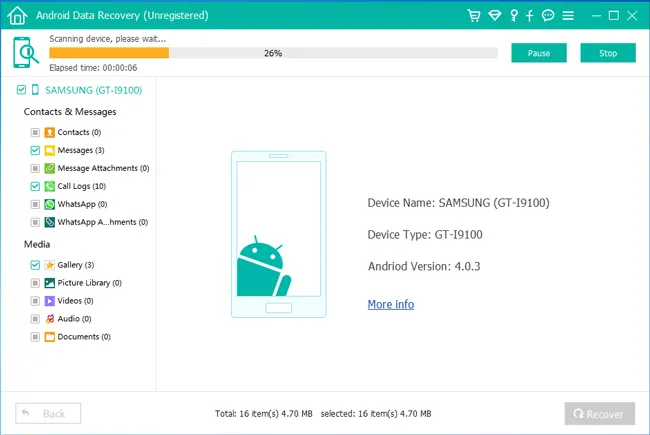

FoneLab Android Data Recovery is a software tool. It is designed to help users recover lost or deleted data from Android devices. The software is specially designed for Android devices and can recover different types of data like contacts, messages, call logs, photos, videos, documents, etc.
OVERVIEW OF FONELAB ANDROID DATA RECOVERY
FoneLab Android Data Recovery is a comprehensive and user-friendly software tool designed to meet the data recovery needs of Android users. Developed by Aiseesoft, this software is specially designed for Android devices and offers a reliable solution to recover lost or deleted data in various versions. The main function of the software is to recover various data such as contacts, messages, call logs, photos, videos, documents, etc. Its versatility includes both rooted and non-rooted Android devices, providing flexibility based on user preferences and device settings.
One of the key features of FoneLab Android Data Recovery is its user-friendly interface, which makes it accessible to users with varying levels of technical expertise. The intuitive design simplifies the recovery process and guides users through the steps needed to recover their valuable data. The selective recovery option allows users to select specific types of data to recover, ensuring a more efficient and customized recovery experience.
In case of data loss due to accidental deletion, system crash, rooting error, and other unforeseen circumstances, FoneLab Android Data Recovery acts as a reliable solution. The software is equipped with a preview feature that allows users to preview the recoverable files before starting the recovery process. This preview feature adds an extra layer of assurance that users will only recover the data they intend to recover.
FoneLab Android Data Recovery goes beyond basic recovery by tackling more complex scenarios. It allows you to recover data from broken or damaged Android devices even if the device is not fully functional. This feature enhances the software and makes it suitable for a wide range of situations where data acquisition may be considered a challenge.
Since privacy and security are paramount, FoneLab Android Data Recovery pays special attention to protecting user data. The software is designed to securely handle the recovered data and emphasizes user privacy and confidentiality during the recovery process. FoneLab Android Data Recovery is characterized by comprehensive features and user-friendly features that make it a valuable tool for Android users looking for a reliable and effective device data recovery solution.
FEATURES OF FONELAB ANDROID DATA RECOVERY
RECOVER MULTIPLE DATA TYPES
This feature allows you to recover a wide range of files from browsers or social media apps, including contacts, text messages, call history, WhatsApp chats and attachments, photos, videos, audio files, documents, and app data. Users can selectively scan and preview files before recovering to avoid unnecessary data transfer. It supports recovery from internal storage, SD card, and SIM card without overwriting existing data. This process handles common loss scenarios such as accidental deletion, factory reset, system crash, and forgotten password, making it suitable for a wide range of applications for both personal and professional use. With the help of deep scanning modes, even permanently deleted items can be recovered effectively.
PREVIEW AND SELECTIVE RECOVERY
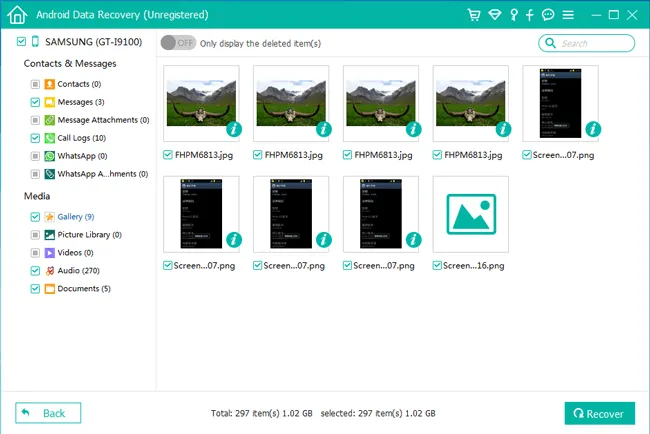
Before finishing, the software displays a preview panel, allowing users to view thumbnails of photos/videos, read messages, or check contact information. This selective recovery allows you to select only the files you need, saving time and storage space on your computer. Filtering by file type or date further refines the results. It is convenient for your software analysis work, and supports exporting recovered data in its original format or in HTML/CSV format for documentation and review purposes.
SUPPORT FOR BROKEN OR LOCKED DEVICES
It is great for recovering data from black screen, unresponsive, or locked Android phones through special modes. Connect your device, select the type of error (e.g., operating system crashed, forgotten PIN), and the tool will let you extract accessible files. Compatible with Samsung, Huawei, Google Pixel, and thousands of other Android models up to the latest versions. This is especially useful in cases such as water damage recovery after a dry spell or post-virus cleaning.
BACKUP AND RESTORE
In addition to recovery, the built-in backup tools create a complete copy of your device on your computer, protecting it from future loss. Selectively restore from a backup without overwriting it completely. Supports scheduled backups and cloud integration previews, improving the data management workflow for multimedia-intensive users like you who focus on creating Android content.
SYSTEM REQUIREMENTS
- Supported OS: Windows 11/10/8.1/7
- Memory (RAM): 2 GB of RAM or more is required
- Hard Disk Space: 200 MB or more required