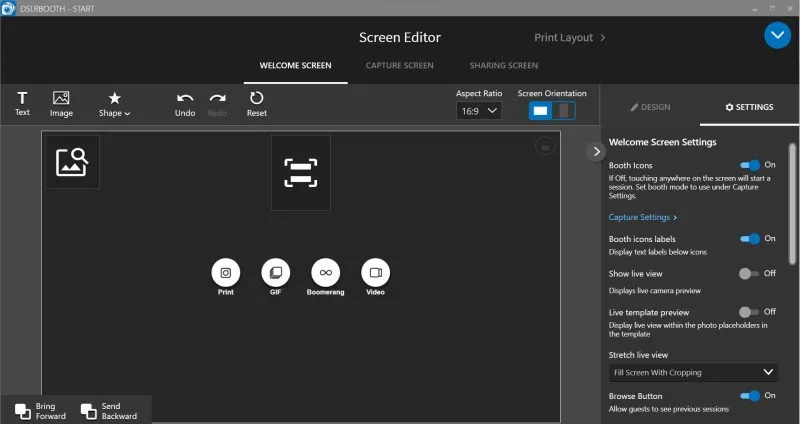
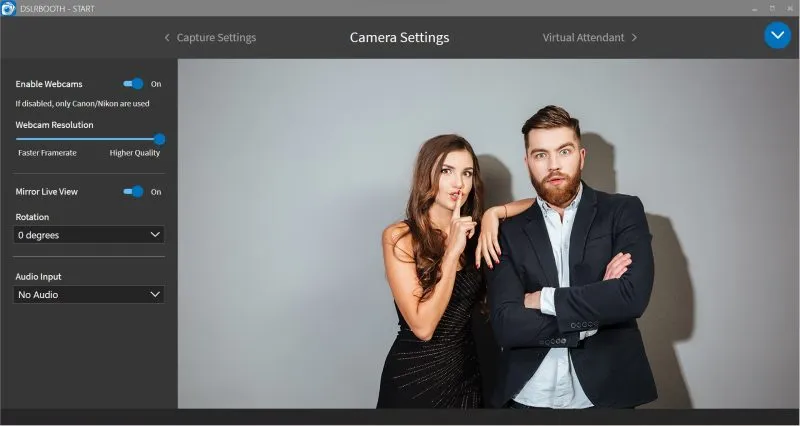

LumaBooth dslrBooth Professional is a professional photo booth software for DSLR and mirrorless cameras, featuring customizable templates, live preview, green screen, GIFs, and instant sharing to social media. It’s ideal for events, weddings, and businesses, delivering high-quality prints and an engaging digital photography experience.
OVERVIEW OF DSLRBOOTH
dslrBooth is a powerful, professional photo booth software designed to transform DSLR and mirrorless cameras into interactive, event-ready photo booths. Widely used for weddings, parties, corporate functions, and promotional events, it has become the preferred solution for photographers, event planners, and businesses looking to create engaging, high-quality photo experiences. Its balance of simplicity, reliability, and advanced features makes it suitable for both beginners and seasoned professionals.
One of the strengths of dslrBooth is its ability to capture professional-quality photos while offering fun, interactive options for guests. Users can take advantage of customizable print templates to design a template that fits a specific theme, brand, or personal preference. These templates can include logos, text, and graphics, making it ideal for corporate events or weddings where branding is important.
The software supports advanced features such as green screen technology, which allows guests to replace the background with almost any image. This feature adds an extra layer of creativity, making it popular for themed parties and promotional events. In addition, dslrBooth includes options to create animated GIFs, boomerangs, and short video clips to meet the growing demand for dynamic, shareable content.
dslrBooth is seamlessly integrated with modern sharing options. Guests can share their photos directly via email, SMS, QR codes, or social media. This not only enhances the guest experience, but also helps businesses and event organizers increase online visibility through branded content. The software’s ability to deliver both digital and print output ensures versatility, as some events prioritize direct physical printing, while others focus on digital sharing.
FEATURES OF DSLRBOOTH
COMPLETE PHOTO BOOTH SOFTWARE SOLUTION
dslrBooth Professional is an advanced, feature-rich photo booth software for professional photographers and event planners. It provides a complete platform for creating interactive photo booths at weddings, parties, corporate events, and other public gatherings. The software is compatible with DSLR cameras and high-quality webcams, allowing users to capture professional-quality, stunning photos. It supports both Windows and macOS systems and offers smooth operation and easy setup. With a modern interface and powerful automation tools, dslrBooth Professional simplifies the process of capturing, editing, and sharing photos, providing a seamless experience for operators and guests.
CUSTOMIZABLE TEMPLATES AND LAYOUTS
One of the standout features of dslrBooth Professional is its wide range of customizable templates and layouts. Users can print unique photo booths with custom backgrounds, overlays, logos, and text to match any event theme or brand. The built-in template editor features drag-and-drop capabilities, making it easy to adjust the placement, size, and color scheme of images. Additionally, users can create animated GIFs, Boomerangs, and multi-image collages to maximize their creativity. The ability to save and reuse templates across multiple events helps photographers maintain brand consistency and workflow efficiency.
GREEN SCREEN AND BACKGROUND REPLACEMENT
dslrBooth Professional includes advanced green screen (chroma key) technology that allows users to replace the background of their photos with any digital photo or video without leaving the comfort of their hotel. This feature is ideal for creative events that can take place anywhere from themed parties, marketing campaigns, or even exotic beach parties to branded venues without leaving the comfort of their own home. The software automatically detects and replaces green screen backgrounds, creating a smooth, natural look. Combined with convenient layers and effects, the green screen tool enhances the visual value and professionalism of any photo booth setup.
LIVE VIEW, AUTO CAPTURE, AND PRINT OPTIONS
With dslrBooth Professional, users can take advantage of real-time camera previews via the Live View feature, which helps guests position themselves perfectly before the photo shoot. The Auto Capture option automates the photo capture process with a timer and audio cues, reducing manual intervention. After capturing images, the software processes and prints them directly using connected printers. Users can customize multiple print sizes, formats, and paper layouts, providing flexibility for different event requirements. Instant Print capabilities allow guests to receive high-quality photo souvenirs in seconds.
INSTANT SHARING AND CLOUD INTEGRATION
In today’s social media-driven world, dslrBooth Professional excels with its instant sharing and cloud integration capabilities. Guests can easily share their photos, GIFs, and videos via email, SMS, or popular social media platforms like Instagram, Facebook, and Twitter. The software supports automatic upload to an online gallery or cloud storage, allowing event organizers to manage and access media remotely. With a built-in sharing station and QR code generation, digital sharing is faster and more convenient than ever before, as guests can scan images and download them directly.
ANALYTICS, BRANDING, AND PROFESSIONAL SUPPORT
In addition to its creative features, dslrBooth Professional offers powerful analytics and branding options that are beneficial to business and marketing professionals. Event organizers can track engagement metrics such as photos taken and shares made to measure the success of their campaigns. Branding options allow you to add logos, watermarks, and promotional messages to each image, transforming each image into a personalized marketing tool. In addition, the software provides reliable technical support, ongoing updates, and compatibility with a wide range of DSLR cameras and printers, ensuring optimal performance for professional users. dslrBooth Professional stands out as one of the best photo booth solutions with its combination of automation, customization, and commercial-ready tools for modern events and photography businesses.
SYSTEM REQUIREMENTS
- Supported OS: Windows 11/10/8.1/7
- Memory (RAM): 1 GB of RAM or more is required
- Hard Disk Space: 300 MB or more required