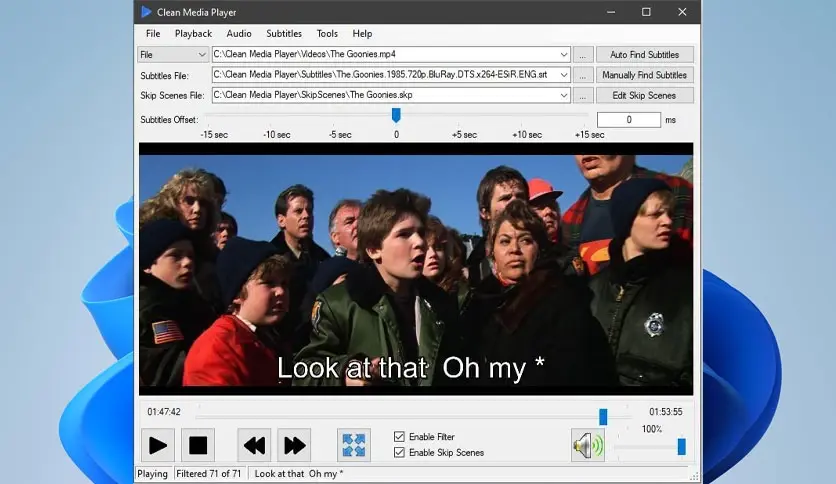

Clean Media Player is a versatile media player designed to filter out offensive content and provide a clean, family-friendly viewing experience. One of its unique features is a profanity filter that mutes the audio during inappropriate scenes and replaces offensive words with subtitles.
OVERVIEW OF CLEAN MEDIA PLAYER
Clean Media Player is a user-friendly and advanced media player that offers content filtering, scene management, and streaming options that will enhance your viewing experience. One of its key features is the ability to create clean video files by removing offensive language through a profanity filter that mutes audio and replaces offensive words in subtitles. Users can customize the profanity filter by muting it or replacing it with a user-defined version, making it ideal for family-friendly viewing or for use in professional environments where inappropriate language is unacceptable.
In addition, Clean Media Player supports direct streaming from a DLNA-enabled local network media server, allowing users to watch their favorite movies from their personal collections stored on a media server, DVD, or Blu-ray. For further customization, users can specify which words trigger the mute and set a precise offset to control the start and end of the mute relative to subtitles containing offensive language.
Another unique feature of Clean Media Player is the scene skip function. Users can specify the start and end times of their favorite scenes and automatically avoid sensitive and unwanted content. These skipped scenes can be saved locally or shared with others, and the program offers the ability to automatically sync downloaded skipped scenes to ensure they are fully compatible with local files. Subtitle synchronization tools allow users to manually or automatically adjust subtitle timings. Overall, Clean Media Player offers a comprehensive solution for those looking for a clean, customizable, and family-safe media playback environment.
FEATURES OF CLEAN MEDIA PLAYER
CREATE A CLEAN VIDEO FILE WITHOUT IMAGE FILTER DETAILS
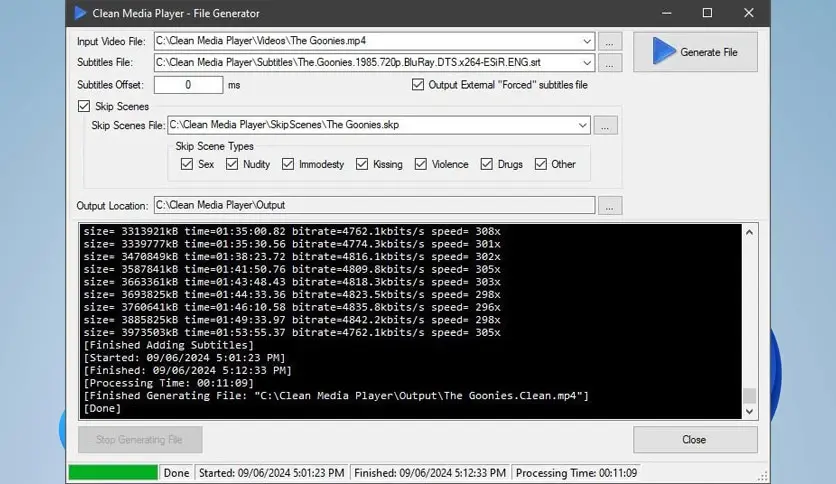
Clean Media Player offers a powerful video file generator that creates clean versions of movies and shows by muting offensive audio during inappropriate dialogue and displaying subtitles without offensive words or phrases. It includes two subtitles, one that only displays subtitles when muted and the other that displays all subtitles, giving viewers the flexibility to choose the experience they prefer. This feature allows for family-friendly or professional viewing environments, and allows viewers who are sensitive to profanity and explicit content to use it for personal purposes. The ability to fine-tune the mute, replace, and mute offsets improves the accuracy of content filtering.
DIRECTLY STREAMING FROM PERSONAL SERVERS AND PHYSICAL DISCS
The player supports streaming from DLNA-enabled devices and personal media servers, such as DVDs and Blu-ray discs. This direct streaming feature allows users to seamlessly access their favorite movies and series stored on network servers, eliminating the need to transfer or convert large files. It offers high compatibility with various media sources and allows for uninterrupted playback while maintaining a clean viewing experience with active filtering during streaming sessions.
FULLY CUSTOMIZABLE FILTER WITH MULTIPLE LAYERS
Clean Media Player’s profanity filter is highly customizable, allowing users to specify words to mute or replace offensive words and phrases with subtitles. Users can input their own words to replace offensive language, which helps preserve context without revealing specific content. The software includes a mute time setting, which allows users to set the time and duration for which the audio is muted before offensive subtitles appear. This ensures smoother audio transitions and natural-sounding censorship.
AUTO-SYNC AND SHARE SKIPPED SCENES
Users can skip specific scenes by selecting the start and end times of unwanted or sensitive content. Skipped scenes are stored locally and have the option to upload and share them with other users, creating reusable skip scenes for filtered content. The software also allows for automatic synchronization of skip scenes to perfectly match various local video files or network-streamed content, which increases the reliability and usability of different video versions.
SUPPORTS ALL MAJOR VIDEO FORMATS AND AUDIO TYPES
The media player supports a wide range of video formats, including MP4, MKV, AVI, MPEG, and special formats used in DVDs and Blu-rays. In addition, it supports a wide range of audio formats, including MP3, WMA, WAV, and FLAC, allowing users to play almost any media file without any compatibility issues. This wide range of format support makes it a versatile choice for a wide range of media playback needs.
SYSTEM REQUIREMENTS
| Operating System (OS) | Windows 11/10/8.1/7 |
| Processor | Minimum 1 GHz Processor (2.4 GHz recommended) |
| Memory (RAM) | 2GB (4GB or more recommended) |
| Disk Space | 300MB or more is recommended |