
Driver Easy Professional is a powerful Windows tool that automatically detects, downloads, and installs the latest drivers for your system. It helps your computer run smoothly by resolving driver issues and improving performance. With just a few clicks, it updates outdated or missing drivers, supports scheduled scans, and offers offline scans for even easier access.
OVERVIEW OF DRIVER EASY PROFESSIONAL
Driver Easy Professional is a comprehensive driver management tool designed to help Windows users easily and safely update and maintain their system drivers. Hardware manufacturers are constantly releasing updates to fix bugs, improve compatibility, and increase performance, so it is important to keep your drivers up to date to ensure system stability. Driver Easy Professional simplifies this process with a variety of automated features, saving users time and avoiding the risks associated with manually searching for the right drivers.
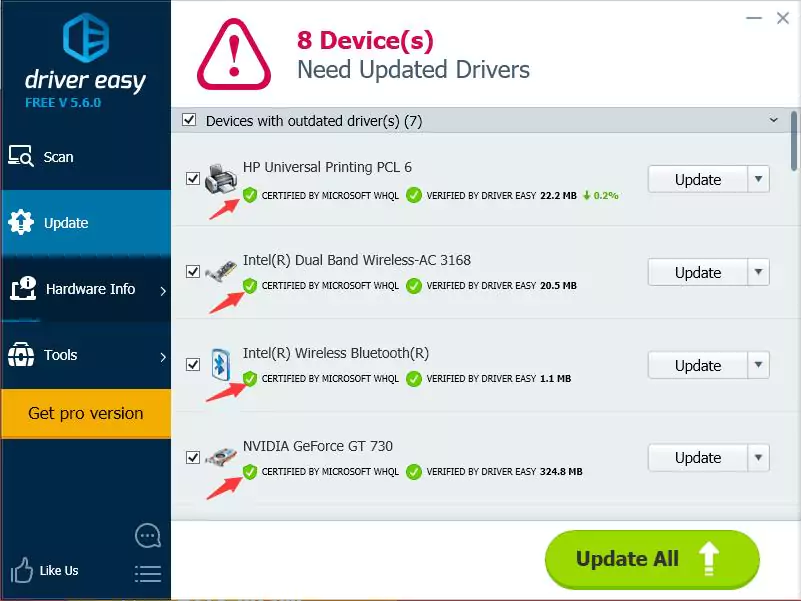
The software begins a thorough scan of your entire system to detect outdated, missing, or incompatible drivers. After the scan is complete, Driver Easy provides a detailed report that allows you to update all outdated drivers with one click. Unlike the free version, the Professional version allows you to automatically download and install drivers, which eliminates manual intervention. This not only speeds up the update process, but also allows you to install all drivers correctly without user error.
Driver Easy Professional has the ability to automatically create restore points before each update. It acts as a safety net and allows users to roll back to a previous system state in case a newly installed driver causes problems. In addition, the tool supports scheduled scans, allowing users to scan regularly without having to manually initiate a driver update. This proactive approach helps prevent problems before they occur.
FEATURES OF DRIVER EASY PROFESSIONAL
AUTOMATIC DRIVER DETECTION
Driver Easy Professional is designed to simplify the tedious process of identifying outdated or missing drivers on your computer. Instead of manually searching for each driver update, the software automatically scans the system and detects outdated, missing, and incompatible drivers. This feature is especially useful for users who are not familiar with hardware specifications or who want to save time on repairing their computer. Automatic detection allows you to always identify the latest version of drivers without the risk of downloading the wrong files from an unverified source.
ONE-CLICK DRIVER UPDATES
While manually updating drivers can be time-consuming and error-prone, Driver Easy Professional offers one-click driver updates to simplify the process. After scanning the system, the software provides a list of available updates and allows users to update them all at once with one click. This eliminates the hassle of downloading drivers individually, making it an effective solution for both beginners and professionals. The one-click update process is safe and compatible with the installed hardware, reducing the risk of system crashes and performance issues.
OFFLINE SCAN AND DRIVER INSTALLATION
One of the standout features of Driver Easy Professional is its offline scanning capabilities. This is especially useful when the computer is not connected to the Internet and drivers cannot be downloaded directly. Offline scanning allows users to generate a report of the required drivers and download them to another device that is connected to the Internet. Once drivers are found, they can be installed on an offline computer. This feature prevents network drivers from disappearing, losing online access, and helps restore connectivity quickly.
DRIVER BACKUP AND RESTORE
Driver Easy Professional provides an important safety net with driver backup and restore features. Before installing new drivers, the program allows users to back up their current drivers. This allows the user to roll back to a previous version in case a newly installed driver causes problems. Having this backup system prevents downtime and makes troubleshooting easier, especially for users who work with critical system drivers such as graphics, audio, or network drivers. This is a reliable way to ensure system stability during an update.
SYSTEM OPTIMIZATION AND HARDWARE INFORMATION
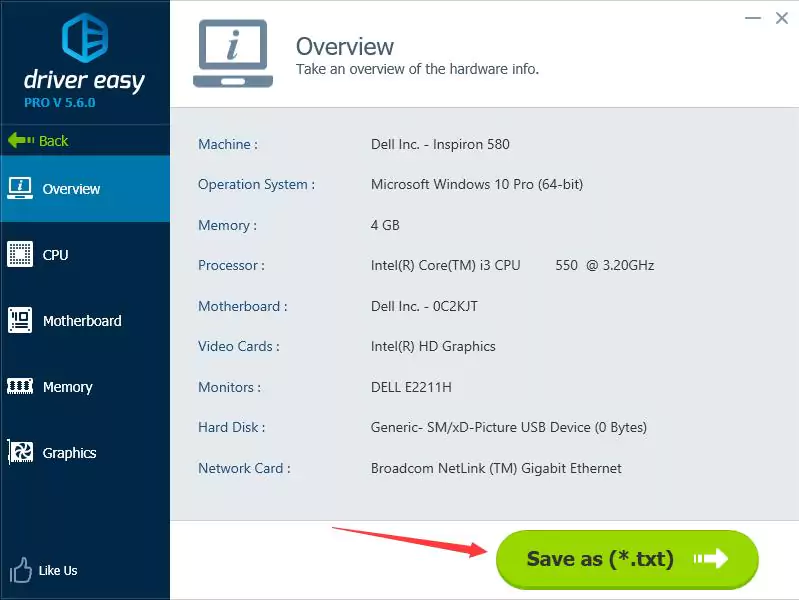
In addition to updating drivers, Driver Easy Professional helps optimize system performance by keeping hardware up to date with the latest updates. Outdated drivers can cause performance slowdowns, crashes, and device malfunctions, but keeping them updated regularly can solve these problems. Furthermore, the software provides detailed information about the system hardware, including CPU, motherboard, graphics card, and memory specifications. This built-in hardware diagnostic tool allows users to better understand their system and identify hardware-related issues.
USER-FRIENDLY INTERFACE AND SCHEDULING
Driver Easy Professional is designed with a simple and intuitive interface, making it easy to navigate even for non-technical users. With all the basic functions neatly organized, users can access the scan, update, backup, and restore options without any confusion. In addition, the program supports scheduled scans, allowing users to automatically scan every day, weekly, or monthly. This allows drivers to be updated without the need for constant manual checks. The clean interface and customizable software balance ease of use and efficiency.
SYSTEM REQUIREMENTS
- Supported OS: Windows 11/10/8.1/7
- Memory (RAM): 1 GB of RAM or more is required
- Hard Disk Space: 100 MB or more required